







MicTune

Sing in tune. Live.

MicTune turns your computer into a live vocal processor: real-time pitch correction, reverb, delay, harmonies and the backing track taken from YouTube, Spotify or VLC. Free on macOS, Windows and Linux.

Version 1.3.1 macOS, Windows, Linux Free

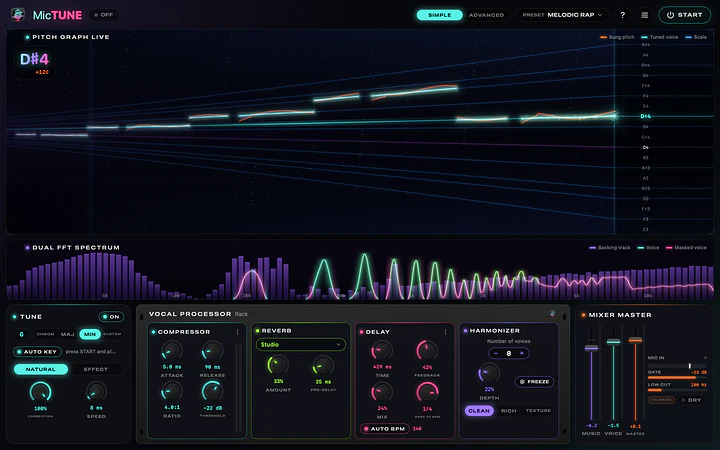
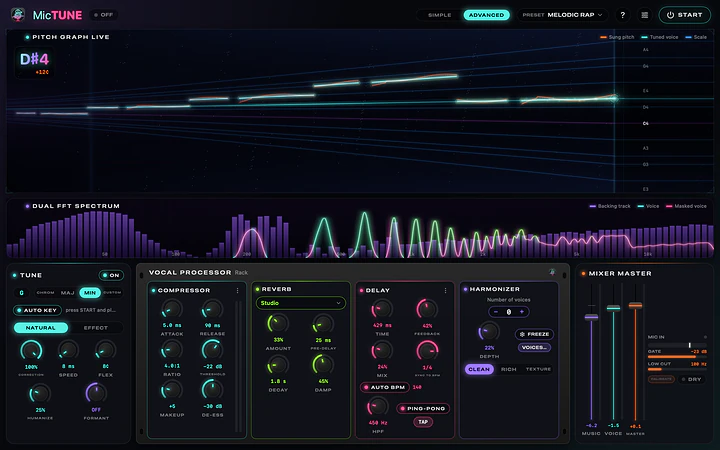
Real screenshot of MicTune

Singing in tune live usually takes a hardware processor or a plugin inside a DAW. MicTune does it on its own: grab a mic and headphones, play the song from any app and pick a style. Your voice is corrected in real time at very low latency, naturally or with the robotic trap effect, and the harmonies follow the song's key.

Sing in tune. Live.

Live pitch correction, on your computer.

In tune, not robotic.

NATURAL correction brings your voice to the centre of the note and keeps vibrato and slides, like today's records. If you want the robotic trap snap instead, there is EFFECT. The Pitch Graph shows your sung and tuned voice live.

  • AUTO KEY detects the song's key by itself
  • CORRECTION at 70–85% to keep more of your own voice
  • SPEED: 0–8 ms is audible, 20–40 ms is almost invisible
  • Dual spectrum: backing track, voice and masked voice side by side
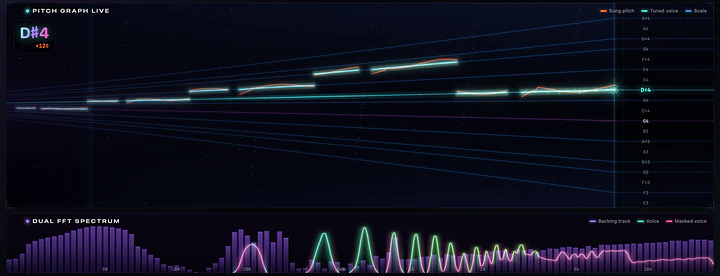
In tune, not robotic.

Pick a style. Sing.

Play the song on YouTube, Spotify, VLC or any other app: MicTune captures it and mixes it with your voice, with no cables or extra software. Then pick a preset and press START.

  • Natural presets: Melodic Rap, Urban Pop, Indie Pop, Ballad Arena…
  • Hard-tune presets: Trap Hardcore, Dark Trap, Ambient Trap…
  • AUTO BPM detects the tempo and keeps the echoes in time
  • SIMPLE mode with just the essential controls
Pick a style. Sing.

A studio rack, at near-zero latency.

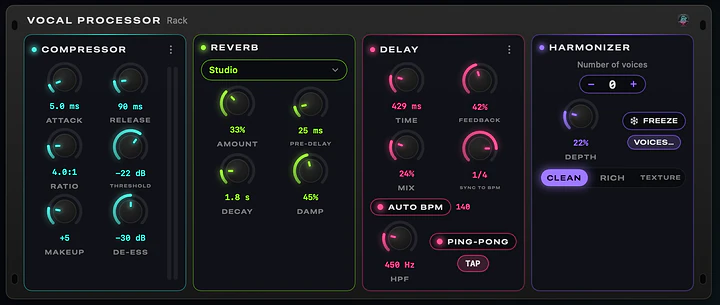
Compressor, reverb, delay and a 4-voice harmonizer that follows the key and keeps the singer's timbre. Harmonies arrive a few milliseconds after your voice, like a choir: your lead voice keeps its near-zero latency.

  • FREEZE (key F) holds the note you sing as a pad
  • Harmony character: Clean, Rich or Texture
  • Tempo-synced delay with AUTO BPM, ping-pong and tap
A studio rack, at near-zero latency.

The song's exact notes, from MIDI.

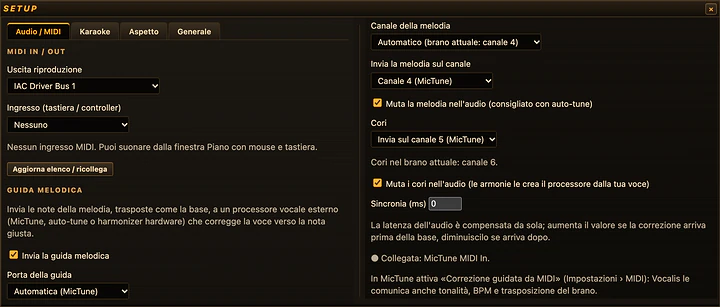
Send the melody as MIDI notes to the MicTune MIDI In port, from Vocalis, Logic, Ableton or a keyboard: your voice is tuned to the song's exact notes, not a fixed scale, with 0 ms extra latency. If the song has a chorus track, the harmonies sing those notes with your voice.

  • With Vocalis 1.2 (Vocalis Link) channels, key and BPM arrive by themselves
  • The Pitch Graph shows the note to sing as a golden rail
  • Channel, priority, pitch bend and "Follow the octave" in Settings › MIDI
The song's exact notes, from MIDI.

Every parameter, when you need it.

ADVANCED mode opens up every control: humanize and formant in the correction, de-esser in the compressor, decay and damping in the reverb, filter and ping-pong in the delay. Send to headphones and PA at the same time, with mic cleanup.

  • Auto-configure picks the best combination of the connected devices
  • CALIBRATE removes the correction from the backing track leaking into the mic
  • Works with USB mics, audio interfaces and USB mixers
Every parameter, when you need it.

Mac, Windows and Linux. Same sound.

The same app, with the same sound and the same look, on all three systems. It updates itself: it downloads the new version in the background and installs it when you quit, never during a live set.

  • Full guide inside the app: Help › MicTune Guide
  • English, Italian, French, German and Spanish
  • On Windows the backing track is captured from every app; on Linux with PipeWire apps play through MicTune

At a glance

Systems
macOS 15+ (Apple Silicon), Windows 10 (2004) or 11 64-bit, 64-bit Linux with PipeWire
Correction
Natural or effect, with AUTO KEY and custom scales
Effects
Compressor, reverb, delay, 4-voice harmonizer with FREEZE
Backing track
Captured from YouTube, Spotify, VLC or any app
MIDI
MIDI-guided correction and backing vocals via the MicTune MIDI In port, Vocalis Link
Inputs
Built-in mic, USB mics, audio interfaces, USB mixers
Languages
English, Italian, French, German, Spanish
Updates
Automatic, installed when you quit the app
License
Free

Get MicTune.

Pick the file for your system. Every download comes straight from the official releases on GitHub.

macOS

Open the DMG and drag MicTune into Applications, then open it from there. Press START and allow Microphone and Audio Recording.

Windows

Run the installer: it installs for your user, no administrator password. For the MIDI guide from Vocalis create a loopMIDI port named MicTune MIDI In.

Linux

Make the AppImage executable (Properties › Allow executing, or chmod +x) and open it. PipeWire is required.

Release notes on GitHub

Requirements

macOS 15 or later on Apple Silicon Macs (M1, M2, M3, M4…), Windows 10 (2004) or 11 64-bit, 64-bit Linux with PipeWire (Debian 13, Ubuntu 25.04 or newer). A microphone and, recommended, wired headphones.

License

Free. MicTune is an independent project, not affiliated with or endorsed by Antares Audio Technologies (owner of the Auto-Tune® trademark); other product names are used only to describe compatibility.

Questions and answers

Is MicTune free?

Yes, MicTune is free. If you find it useful, you can support its development with a donation.

What do I need?

A microphone (the built-in one, a USB mic, an audio interface or a USB mixer) and, recommended, wired headphones. Avoid Bluetooth headphones and speakers: they add 100–200 ms of delay.

How do I play the backing track?

Play the song on YouTube, Spotify, VLC or any app: MicTune captures it and mixes it with your voice. In Settings › Audio & Mixer choose all system audio or a single app.

It sounds robotic: how do I make it more natural?

Switch to NATURAL, raise SPEED to 15–30 ms or pick a natural preset such as Indie Pop, Emotional Pop or Ballad Arena. With CORRECTION at 70–85% more of your own voice remains.

I hear the correction on the backing track.

The mic is picking up the speakers. Press CALIBRATE in the MIXER card and stay silent for 3 seconds, lower the speakers and use headphones.

Does it work with Vocalis?

Yes, natively. In Vocalis 1.2 turn on Setup › Audio / MIDI › Melody guide: MicTune shows VOCALIS LINK and in Simple mode key, BPM, guide and backing vocals configure themselves.

The system blocks the app on first launch: what do I do?

The installers are not code-signed yet. On macOS open System Settings › Privacy & Security, scroll down and click Open Anyway. On Windows, if "Windows protected your PC" appears, click More info › Run anyway. Then allow Microphone and Audio Recording.

Is it Auto-Tune?

No. MicTune is an independent live pitch-correction project; Auto-Tune® is a trademark of Antares Audio Technologies, which has no connection with MicTune.

Is MicTune useful to you?

MicTune is free and built after hours. If it makes you sing better, a donation pays for signed installers, so macOS and Windows stop asking for confirmation on first launch, and for the time to build the next versions.

Next app: Revive Your Mac fast again after a migration.