ForgeWave

Every wave, in its place.

ForgeWave is a non-destructive audio editor: it opens hour-long files instantly, masters for Spotify and Apple Music, cleans up the spectrum and separates vocals with local AI. Free on macOS, Windows and Linux.

Version 1.0.0 macOS, Windows, Linux Free

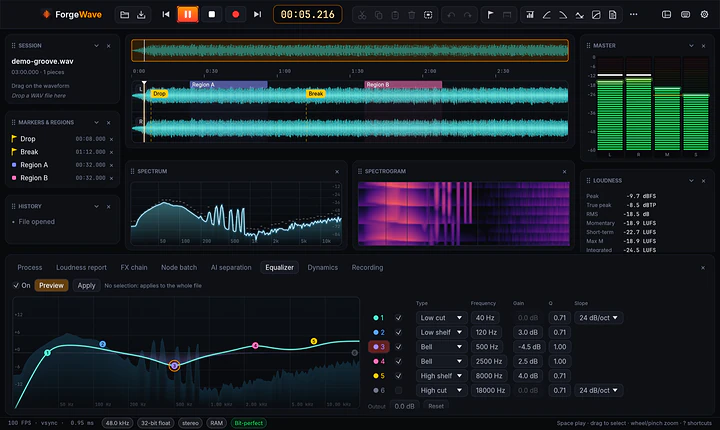
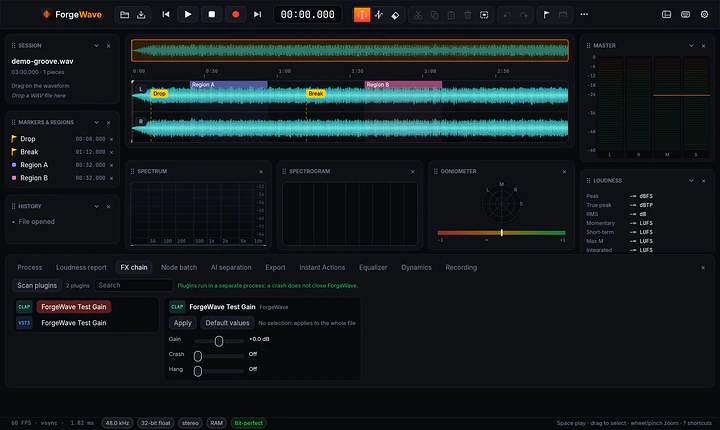
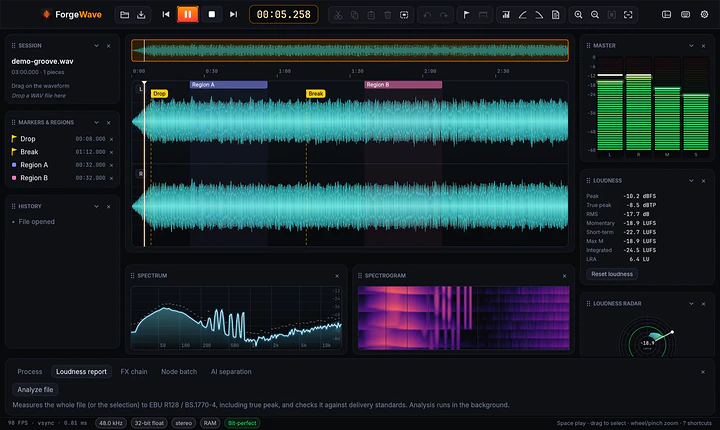
Real screenshot of ForgeWave

Cutting a podcast, preparing a master for streaming, removing a hum or separating vocals from the backing track usually takes several programs, often paid ones. ForgeWave brings them together in a single editor, with the same results on Mac, Windows and Linux. It never touches the original file and every edit can be undone.

Every wave, in its place.

The professional audio editor, free on Mac, Windows and Linux.

Hours of audio, open instantly.

Cut, paste, markers and regions even on huge files, with no waiting. ForgeWave never changes the original: every step stays in the history and can be undone whenever you like.

  • Unlimited undo and redo
  • Bit-perfect playback, scrubbing and meters
  • Projects: save your work and pick it up with every edit
Hours of audio, open instantly.

Processing and mastering, in one place.

Peak or LUFS normalization, fades, 6-band EQ, compressor and true-peak limiter. For mastering there is also multiband, Mid or Side only processing and A/B comparison with a loudness-matched reference track.

  • Instant Actions for the steps you repeat
  • Album assembly with pauses, crossfades, common loudness and CUE sheet
  • EBU R128 loudness with reports for streaming, broadcast and podcasts
Processing and mastering, in one place.

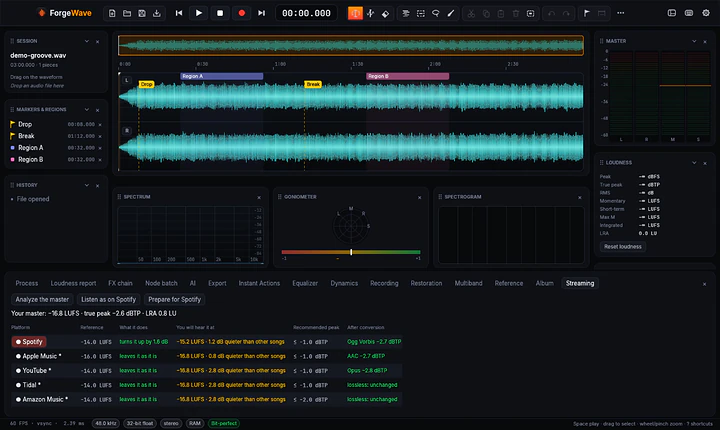
How it will sound on Spotify, before you release it.

ForgeWave tells you what Spotify, Apple Music, YouTube, Tidal, Amazon Music and Deezer will do to your master: whether they turn it down, turn it up or leave it as it is, and the peak after their conversion, actually tested.

  • "Listen as on Spotify"
  • One-click preparation for streaming
  • Loudness reports to attach to a delivery
How it will sound on Spotify, before you release it.

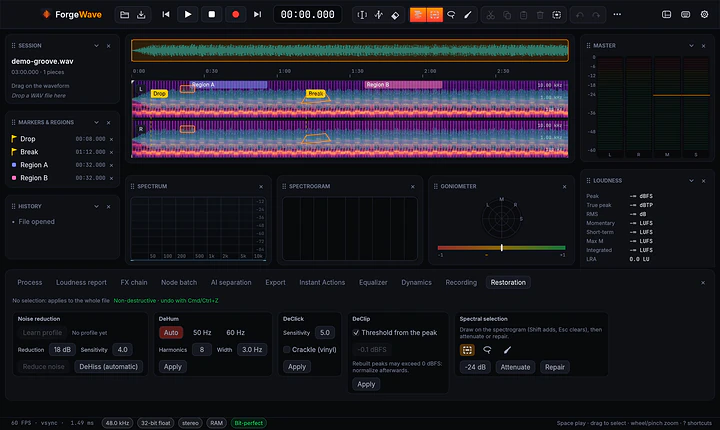
The spectrum, to see and to clean.

In the spectrogram you select a noise by time and frequency and attenuate or repair it, leaving the rest untouched. For the most common problems there is restoration: noise reduction, DeHiss, DeHum, DeClick and DeClip.

The spectrum, to see and to clean.

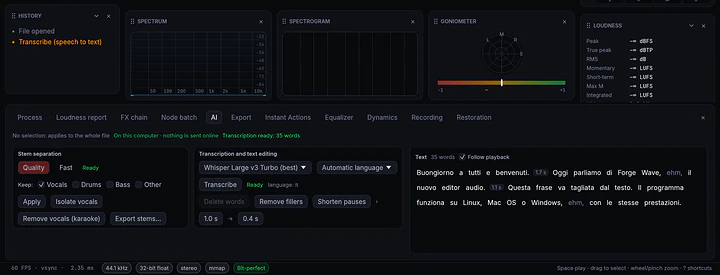
AI, on your computer.

Stem separation (vocals, drums, bass, other), transcription with text-based editing (delete words and the audio is cut) and one-click restoration. All local: your audio never leaves your computer.

  • Models are downloaded once, only when needed
  • Local AI: 8 GB of RAM recommended; on Mac it needs Apple Silicon
AI, on your computer.

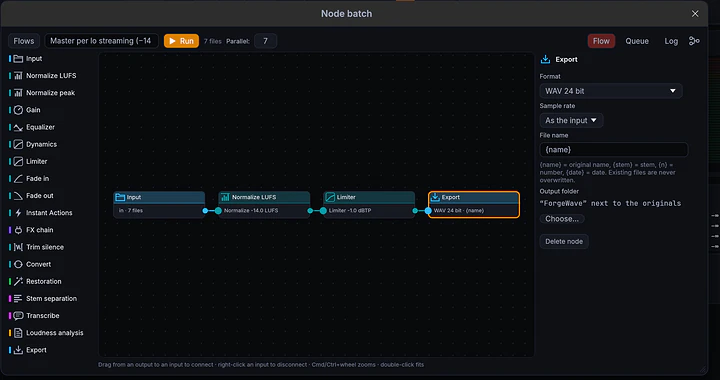
Whole folders, in a flow of nodes.

Connect the steps as nodes (LUFS, EQ, plugins, stem separation, subtitles, export…) and apply them to whole folders, in parallel on every processor core.

Whole folders, in a flow of nodes.

Plugins, recording, export.

CLAP, VST3, AU and LV2 plugins run in a separate process: if one crashes, ForgeWave stays open. Record multichannel, including other apps' and system audio, and export to every format you need.

  • On-the-fly markers while recording (M key)
  • Export to WAV/BWF/RF64, AIFF, FLAC, MP3, OGG, Opus, AAC
  • English, Italian, French, German and Spanish, with a complete built-in guide
  • Automatic updates, signed and verified
Plugins, recording, export.

At a glance

Systems
macOS 13+ (Apple Silicon and Intel), 64-bit Windows 10/11, x86_64 Linux (glibc 2.39+)
Editing
Non-destructive, unlimited undo, markers and regions, projects
Processing
Peak/LUFS normalization, 6-band EQ, compressor, true-peak limiter, multiband, Mid/Side
Loudness
EBU R128 with reports; streaming destination for Spotify, Apple Music, YouTube, Tidal, Amazon Music, Deezer
Restoration
Spectral editing, noise reduction, DeHiss, DeHum, DeClick, DeClip
Local AI
Stem separation, transcription with text-based editing, one-click restoration
Plugins
CLAP, VST3, AU, LV2 in a separate process
Formats
WAV/BWF/RF64, AIFF, FLAC, MP3, OGG, Opus, AAC
Languages
English, Italian, French, German, Spanish
License
Free, including commercial use

Get ForgeWave.

Pick the file for your system. Every download comes straight from the official releases on GitHub.

macOS

Open the DMG and drag ForgeWave into Applications. Works on Apple Silicon and Intel Macs.

Windows

Run the installer: it installs for your user, no administrator needed. There is also a .zip.

Linux

Make the AppImage executable and open it. On Debian and Ubuntu there is also the .deb (sudo apt install ./forgewave_<version>_amd64.deb), or the .tar.gz with install.sh.

Release notes on GitHub

Requirements

macOS 13 or later (Apple Silicon or Intel), 64-bit Windows 10/11, x86_64 Linux with glibc 2.39 or later (Ubuntu 24.04, Debian 13, Fedora 40 and newer; PipeWire or ALSA). Local AI: 8 GB of RAM recommended; on macOS it needs an Apple Silicon Mac.

License

Free, including for professional and commercial use. The source code is not public; open-source components and their licences are listed in the app. MP3 export uses LAME (LGPL), a separate, replaceable library.

Questions and answers

Is ForgeWave free?

Yes, ForgeWave is free, including for professional and commercial use. If you find it useful, you can support its development with a donation.

Does it change the original file?

No. ForgeWave is non-destructive: it works on a virtual copy, every edit can be undone and the original stays as it was until you export.

Does the AI need the internet?

Only to download the models the first time, and only if you use them. Stem separation, transcription and restoration run locally: your audio never leaves your computer.

Can I use my plugins?

Yes: CLAP, VST3, AU and LV2. They run in a separate process, so if a plugin crashes ForgeWave stays open.

How do I prepare a master for Spotify?

In the streaming destination you see what Spotify, Apple Music, YouTube and the other platforms will do to your track, listen to it "as on Spotify" and prepare it with one click. The guide on the site explains LUFS and true peak step by step.

The system blocks the app on first launch: what do I do?

The installers are not signed by Apple or Microsoft yet. On macOS open System Settings › Privacy & Security, scroll down and click Open Anyway. On Windows, if "Windows protected your PC" appears, click More info › Run anyway.

How does it update?

From the app, in Settings › General › Updates: updates are installed only if signed with ForgeWave's key and identical to the published file. If you installed the .deb, update by installing the new .deb.

Is ForgeWave useful to you?

ForgeWave is free and built after hours. If it saves you time (or a subscription), a donation pays for signed installers, so macOS and Windows stop asking for confirmation on first launch, and for the time to build the next versions.

Next app: MicTune Live pitch correction, on your computer.