






AudioSTAX

Hundreds of files, one batch.

AudioSTAX takes a folder of recordings, songs or videos and gives it back in the format you need, all at the same loudness, ready for podcasts, streaming or broadcast. Free and offline, on macOS, Windows and Linux.

Version 0.2.0 macOS, Windows, Linux Free

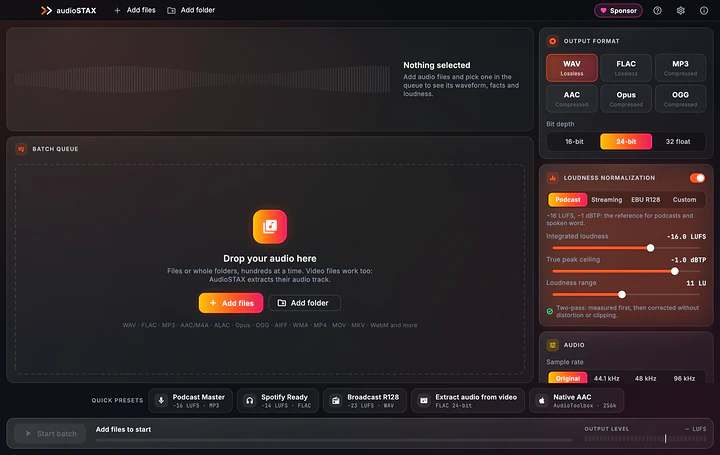
Real screenshot of AudioSTAX

One episode quieter than the next, an interview with a fan humming in the background, a hundred files to turn into MP3 with the same tags: repetitive jobs usually done one file at a time. AudioSTAX does them on the whole folder at once, on your computer, without uploading anything and without touching the originals.

Hundreds of files, one batch.

Convert, normalize to LUFS and clean up hundreds of audio files at once.

A whole folder, in seconds.

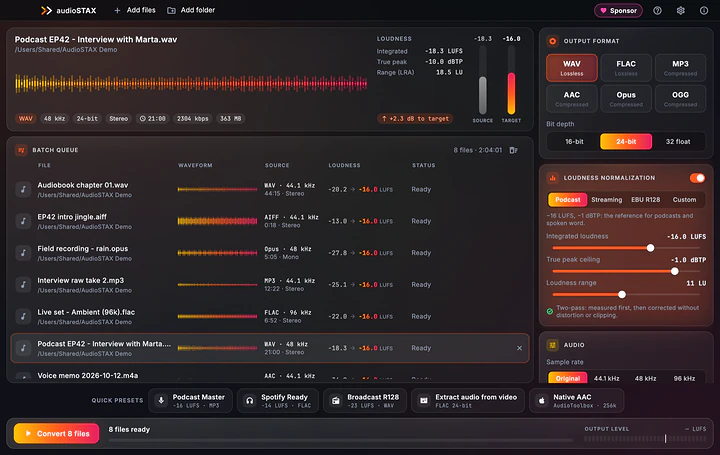
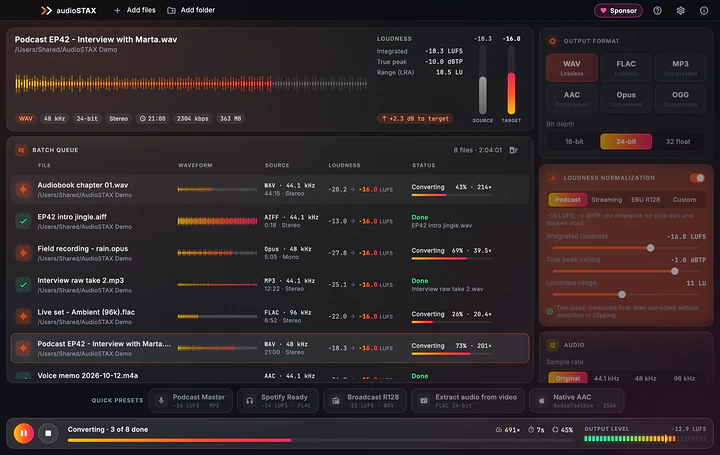
Drag in files or folders, choose the result and press Convert. AudioSTAX works on several files at once, on every core, typically 20 to 100 times faster than real time. Pause, resume or stop whenever you like.

  • WAV (16/24/32-bit float), FLAC, MP3 CBR/VBR, AAC, Opus and OGG Vorbis
  • Progress in the Dock or taskbar
  • Double-click a finished row to find the file
A whole folder, in seconds.

All at the same loudness.

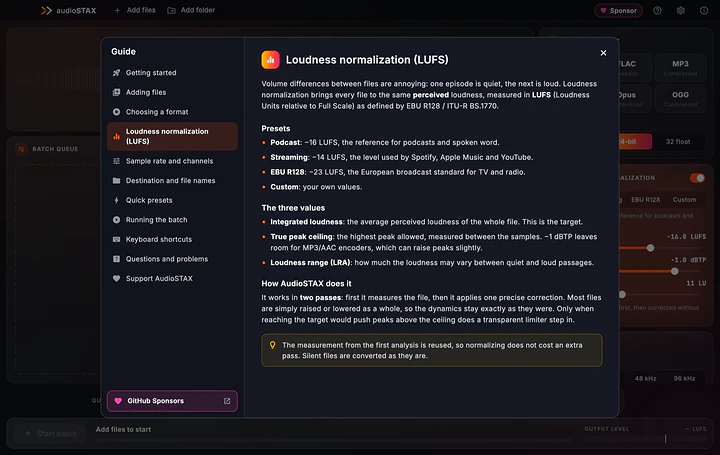
LUFS normalization (EBU R128) measures every file and applies one precise correction that keeps the dynamics, with a true-peak ceiling. Before converting you see the waveform, format, duration and loudness of every file, with the gain needed to reach the target.

  • Presets for podcasts (−16 LUFS), streaming (−14) and broadcast (−23), or your own values
  • Two passes: measure first, then correct, without distortion
  • Quick presets: Podcast Master, Spotify Ready, Broadcast R128
All at the same loudness.

Clean voices and subtitles, for the whole batch.

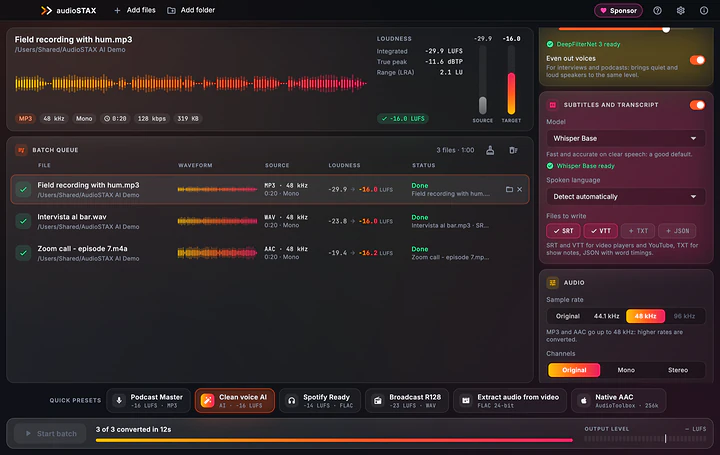
AI noise reduction (DeepFilterNet) removes fans, traffic and noisy rooms; 50/60 Hz mains hum disappears automatically and quiet and loud voices are evened out. Whisper writes subtitles next to every converted file.

  • SRT and VTT for players and YouTube, TXT for show notes, JSON with word timings
  • Language detected automatically
  • All local: audio never leaves your computer
Clean voices and subtitles, for the whole batch.

Tags, cover art and names, just once.

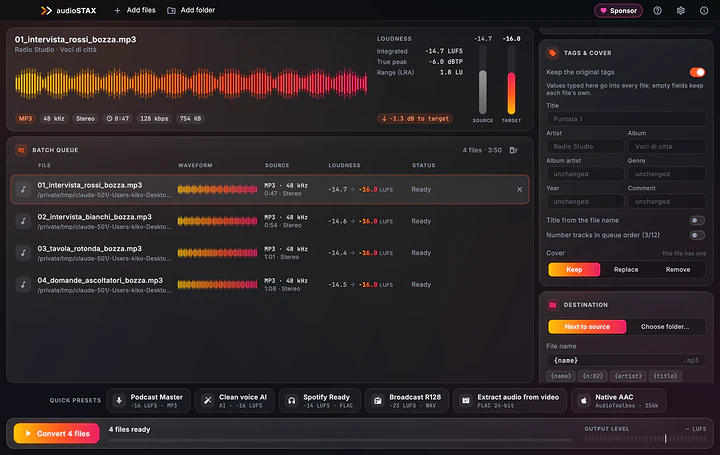
Type artist, album, year or genre once and they go into every file, with the title taken from the file name and track numbers in queue order. You decide the output names with variables and rules, and see the preview before converting.

  • Cover art kept, replaced or removed (MP3, FLAC, AAC)
  • Variables like {n:02} {artist} - {title}, find and replace, letter case
  • Warning when a file with the same name already exists
Tags, cover art and names, just once.

Even the audio from videos.

AudioSTAX reads almost any audio format and also the soundtrack of MP4, MOV, MKV, WebM and AVI videos: the Extract audio from video preset gives you a lossless FLAC in one click. On Mac there is also Apple's own AAC encoder, excellent quality with the CPU almost idle.

Even the audio from videos.

Safe, and well explained.

Originals are never touched: every file is written under a temporary name and renamed only when complete, and you decide whether existing files are renamed, overwritten or skipped. The built-in guide (F1) explains every option, LUFS and the formats.

  • English, Italian, German, Spanish and French
  • FFmpeg included, audio only, with no GPL or non-free parts
Safe, and well explained.

At a glance

Systems
macOS 12+ (Apple Silicon), 64-bit Windows 10/11, x86_64 Linux
Output formats
WAV 16/24/32 float, FLAC, MP3 CBR/VBR, AAC (.m4a), Opus, OGG Vorbis
Input formats
Almost any audio format, plus the soundtrack of MP4, MOV, MKV, WebM, AVI
Loudness
Two-pass LUFS EBU R128 / ITU-R BS.1770, true-peak ceiling; −16, −14, −23 presets
Speech cleanup
AI noise reduction (DeepFilterNet), 50/60 Hz hum removal, voice leveler
Subtitles
Whisper: SRT, VTT, TXT, JSON with word timings
Tags and names
Tags and cover art for the whole batch, names with variables and preview
Speed
Several files at once on every core, typically 20–100× real time
Languages
English, Italian, German, Spanish, French
License
Free, including commercial use

Get AudioSTAX.

Pick the file for your system. Every download comes straight from the official releases on GitHub.

macOS

Open the DMG and drag AudioSTAX into Applications. It needs an Apple Silicon Mac with macOS 12 or later.

Windows

Run the installer: it installs for your user, no administrator rights needed. There is also a portable .zip.

Linux

Make the AppImage executable and open it (FUSE is required). On Debian and Ubuntu there is also the .deb (sudo apt install ./audiostax_<version>_amd64.deb), on Fedora the .rpm, or the .tar.gz.

Release notes on GitHub

Requirements

macOS 12 or later on Apple Silicon Macs, 64-bit Windows 10/11, x86_64 Linux (AppImage with FUSE, .deb, .rpm or .tar.gz). The internet is needed only once, to download the AI models you choose.

License

Free, including for professional and commercial use, on as many computers as you like. The source code is not public; FFmpeg is included as a separate LGPL program and its sources are attached to every release.

Questions and answers

Is AudioSTAX free?

Yes, free, with no ads and no subscriptions, including for professional and commercial use. If you find it useful, you can support its development with a donation.

Does it need the internet?

Only once, to download the AI models you choose (8 MB for noise reduction, 32 to 574 MB for subtitles). Everything else runs offline and no audio ever leaves your computer.

How many LUFS for podcasts and Spotify?

For podcasts −16 LUFS, for Spotify, Apple Music and YouTube −14, for radio and TV −23 (EBU R128), with true peak at −1 dBTP. These are AudioSTAX's presets; the guide on the site explains why. For mastering a single track there is ForgeWave.

How is it different from VideoSTAX?

They are twins: VideoSTAX converts and compresses video with the graphics card, AudioSTAX works on audio only, with LUFS, speech cleanup, subtitles and tags. If you need the audio from a video, AudioSTAX extracts it directly.

Why is my file called "name (1)"?

A file with that name already exists, often the original when converting to the same format in the same folder. Pick another folder, change the name with a variable or choose Overwrite.

A very short clip stays quieter than the target: is that normal?

Yes. Under about 3 seconds loudness cannot be measured reliably, so the file is converted without forcing the level; the same goes for digital silence.

The system blocks the app on first launch: what do I do?

AudioSTAX is not yet signed with an Apple or Microsoft certificate. On macOS right-click the app in Applications › Open › Open, or System Settings › Privacy & Security › Open Anyway. On Windows, if "Windows protected your PC" appears, click More info › Run anyway.

Is AudioSTAX useful to you?

AudioSTAX is free, with no ads and no subscriptions, and built after hours. If it saves you time, a donation pays for code-signing certificates (no more warnings on first launch), test machines for the three systems and the time for new features.

Next app: Revive Your Mac fast again after a migration.