








How to free disk space from node_modules, caches and build folders
Your disk is full and you haven't saved anything big? If you write code, chances are that tens of gigabytes are build folders and dependencies of projects you haven't opened in months. You can delete them: here is which ones and how.
Short answer: anything a command recreates by itself is safe to delete: node_modules (npm install brings it back), Rust's target (cargo build), Xcode's DerivedData, build folders and the npm, pip, Gradle and Homebrew caches. To find them all and remove them safely there is TreeX: treex dev ~ lists them, treex clean moves them to the Trash.
Where the space goes
Every project carries folders that are not your code but downloaded copies or files generated by the compiler. The heaviest:
| Folder | Ecosystem | How it comes back |
|---|---|---|
node_modules | Node.js (npm, pnpm, yarn) | npm install |
target | Rust (and Maven) | cargo build |
~/Library/Developer/Xcode/DerivedData | Xcode | on the next build |
build, .dart_tool | Flutter, Gradle, CMake | flutter build, ./gradlew build |
.venv, venv | Python | python -m venv + pip install -r requirements.txt |
vendor | PHP (Composer), Go | composer install |
~/.npm, ~/.cache/pip, ~/.gradle/caches | package-manager caches | they fill up again by themselves |
A single node_modules often weighs hundreds of megabytes; twenty old projects easily add up to tens of gigabytes.
Finding and deleting them by hand
On Mac and Linux, to see how much every node_modules under a folder weighs:
find ~/Developer -name node_modules -type d -prune -exec du -sh {} + | sort -hOn Windows, Mac and Linux you can also run npx npkill, which lists them and lets you pick which to delete.
Then, project by project or system-wide:
cargo clean                                         # inside a Rust project
flutter clean                                       # inside a Flutter project
rm -rf ~/Library/Developer/Xcode/DerivedData/*      # Xcode, on a Mac
npm cache clean --force                             # npm cache
pip cache purge                                     # pip cache
brew cleanup                                        # old Homebrew versions
Careful with Docker: docker system prune frees a lot of space but also removes stopped containers and unused images. Check first with docker system df.
What not to touch
- the
.gitfolder and your source code; - local configuration files such as
.env, which often aren't in the repository; - lock files (
package-lock.json,Cargo.lock,poetry.lock): they recreate exactly the same dependencies; - the folders of projects you are working on right now: rebuilding them costs time and bandwidth.
Age is the right yardstick: the build folders of a project untouched for three months can go without a second thought.
All of it at a glance with TreeX
TreeX is a free disk analyzer for Mac, Windows and Linux built for developers. It recognises the folders of 16 development ecosystems plus system caches, and shows them as coral towers on a city-like map of your disk.
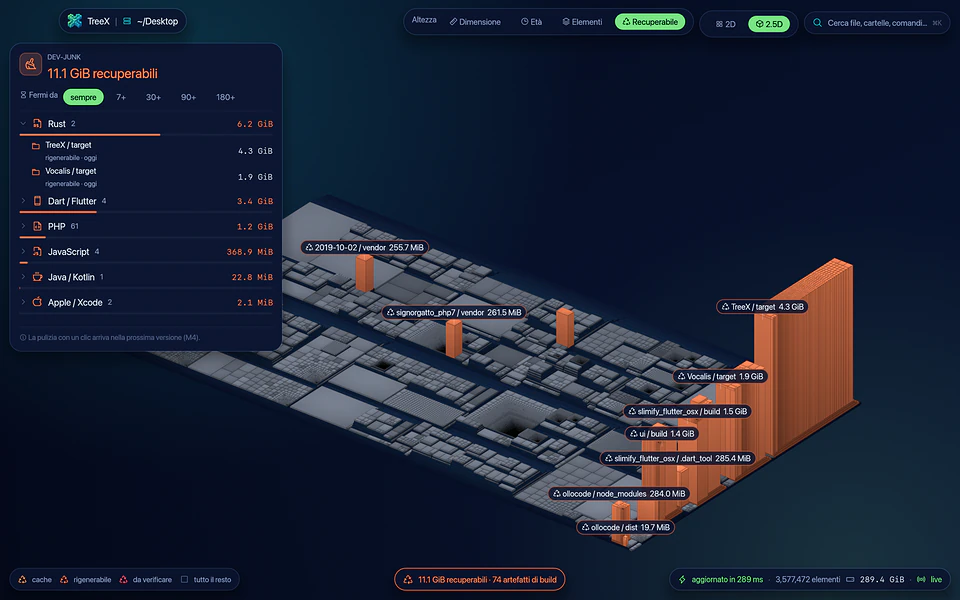
From the command line it takes one command, or the 4 key in the app:
treex dev ~                       # build artifacts and caches you can reclaim
treex clean ~/Developer           # dry run, nothing is deleted
treex clean ~/Developer --apply   # move them to the Trash
Each tower shows the command that recreates the folder and how long its project has been idle, so you can choose calmly what to remove.

Cleaning is designed not to hurt:
- everything goes to the Trash, nothing is deleted for good;
- right before each folder TreeX checks again that it is the same folder, that it is not a symlink, that the project's files are still there and that there is no git repository inside;
- system folders and your home folder are always protected;
- every operation is logged (
treex history).
And it is fast: in the benchmarks published in its repository it is the quickest of the tools compared on all three systems, and from the second analysis on it re-reads only what changed. Download it from the TreeX page.
Frequently asked questions
Is it safe to delete node_modules?
Yes, as long as the project has its package.json (and ideally the lock file): npm install recreates it exactly. The only cost is the download time the next time you open the project.
If I delete DerivedData, will Xcode break?
No. Xcode recreates it on the next build, which will just be a little slower. It is also a classic fix when a build behaves oddly.
Does TreeX delete files forever?
No, by default it moves them to the Trash, where you can restore them. Permanent deletion has to be chosen explicitly.