








Coding with an AI agent without the cloud: Ollama and MLX on a Mac
AI coding assistants send your code to someone else's servers and want a subscription or an API key. With an Apple Silicon Mac you can run a model locally: no cloud, no usage fees, and it works offline. Here is what you need and what to expect.
Short answer: you need a Mac with an Apple chip (M1 or later) and at least 16 GB of memory, Ollama to download and run models, and a model that fits your memory. A local chat only answers; to have code written, run and verified you need an agent such as Ollocode, which works with local models only.
Why local
- Your code stays yours: nothing leaves the Mac. That matters for client projects, code under NDA, and anyone who simply prefers it.
- No usage fees and no API keys to manage.
- It works offline, on a train or on a poor connection.
The price is power: a model that fits in a laptop's memory is less capable than the largest cloud models, and slower. For many tasks it is enough, if it is used the right way.
Which model for which Mac
Memory is the main rule: the model has to fit entirely, together with the conversation's context. These are the models Ollocode uses as its agent depending on the Mac, measured on 14 real projects to build or fix (Go, Python, Node.js, TypeScript, Rust, web), passed only when the automated tests pass:
| Mac | Model | Projects passed | Notes |
|---|---|---|---|
| 16 GB (e.g. Mac mini M4) | qwen3.5:9b | 7 of 14 | small and medium tasks |
| 24 GB | gpt-oss:20b | 5-6 of 14 | very fast, less consistent |
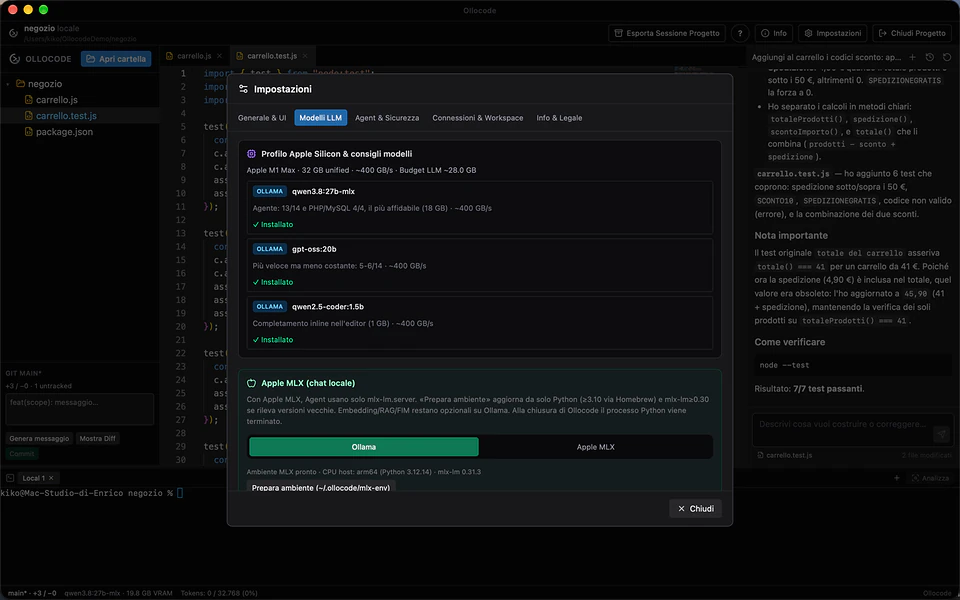
| 32 GB or more | qwen3.8:27b-mlx | 13 of 14 | the most reliable, slower |
One useful finding: code-specialised models built for completion, such as qwen2.5-coder 7B and 14B, proved unreliable as agents in these tests because they misuse tools. For inline completion in the editor, though, a tiny model like qwen2.5-coder:1.5b (1 GB) works great.
MLX is Apple's framework for running models on the Mac's chip: MLX builds of a model make better use of Apple hardware, and that is the build used on Macs with more memory.
Installing Ollama and a model
- Download Ollama from ollama.com, install it and open it.
- In Terminal, pull the model that suits your Mac and try it:
ollama pull qwen3.5:9b    # for a 16 GB Mac
ollama run qwen3.5:9b     # a chat in Terminal, to try it
ollama list               # downloaded models and their size
Now you have a model that answers. But a chat is not enough for coding: it hands you a piece of code and it is up to you to paste it, run it, read the error and ask again.
From chat to agent
An agent does that loop by itself: it reads the project, writes to the files, runs tests and programs, reads the errors and keeps fixing until the work actually works. With local models this matters even more, because they make more mistakes: an agent that checks every step catches and fixes its own errors.
Ollocode is a free macOS IDE built around that idea, with local models only (Ollama or MLX):
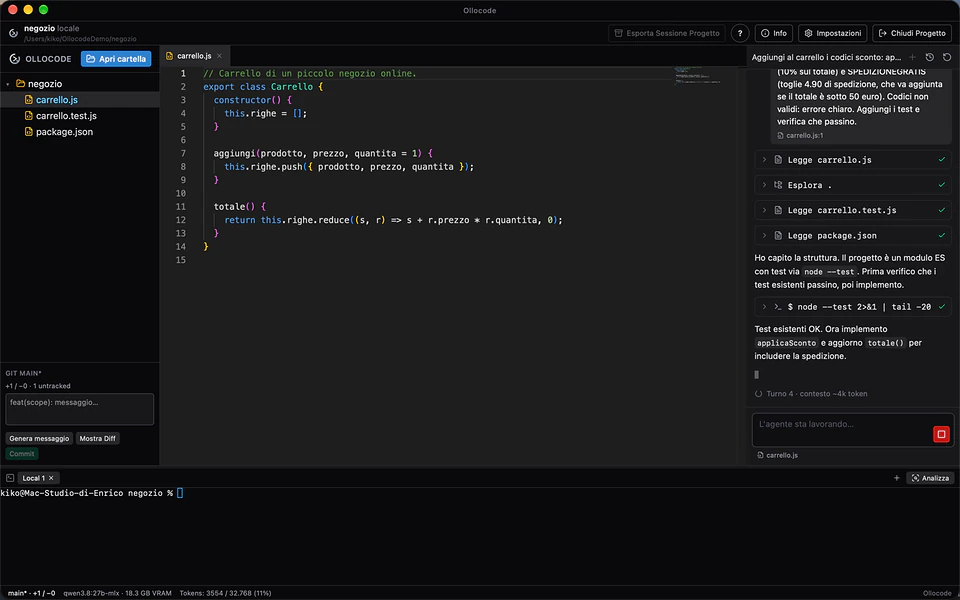
- it doesn't settle: work is not done while tests fail or while the latest change has never been run;
- it adapts to your Mac: it reads the chip and memory, picks the model and context measured for that class of Mac and, if the model is missing, offers to download it;
- Plan mode: before touching any file it proposes the steps, and you adjust them until you are happy;
- remote projects over SSH: it works directly on a Linux server, for example with PHP and MySQL;
- built-in editor, diff, Git and terminal, with inline completion from a local model.
Safety: an agent that runs commands
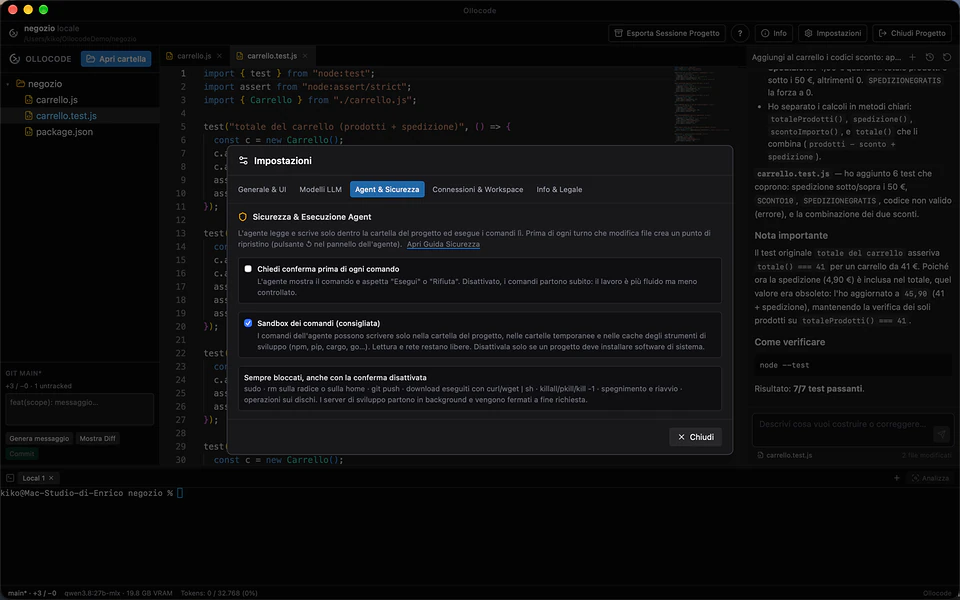
An agent that runs programs needs guardrails. In Ollocode commands run in a macOS sandbox that only allows writing to the project folder, temporary folders and tool caches; a restore point is created before every turn that changes files; and system commands, such as installing software or using sudo, only run when you press Run. Reading the web for up-to-date documentation asks for permission too.
What to expect, honestly
With 16 GB a local agent handles small and medium tasks well: a function, an endpoint, a contained bug, a simple new project. With 32 GB or more the larger model completes almost every test project, but it is slow (about 10 tokens per second on an M1 Max). It does not replace the largest cloud models on the biggest jobs; in exchange your code never leaves the Mac. Ollocode requires an Apple Silicon Mac with at least 16 GB and can be downloaded from its page.
Frequently asked questions
Does it work without an internet connection?
Yes. Once the models are downloaded, both Ollama and Ollocode work offline. You only need a connection to download models and, if you allow it, to let the agent read a web page.
Does it work on Windows or Linux?
Ollama does, Ollocode doesn't: Ollocode is a macOS app and needs an Apple chip (M1 or later). Remote projects, however, can live on a Linux server reached over SSH.
Can I use a different model from the recommended one?
Yes, any Ollama or MLX model. The recommended ones are the most reliable among those measured for each amount of memory.