








A vanBasco alternative for Mac and Linux: a free MIDI/KAR karaoke player
For years, karaoke with MIDI backing tracks meant vanBasco's Karaoke Player. But it is a Windows program that stopped evolving long ago. If you have a Mac, a Linux machine or a recent Windows PC, here is how to keep using your .kar files.
Short answer: to play .kar and .mid files with full-screen lyrics on Mac, Linux and Windows you need a player with a built-in SoundFont synthesizer. Vocalis is free, inspired by vanBasco, already includes a complete General MIDI SoundFont and adds what live nights need: a second screen, setlists and bookings from phones.
What KAR and MID files are
A MIDI file holds no recorded sound, only notes: which instrument plays, when and how hard. A .kar file is a MIDI file that also carries the song's lyrics, synchronised syllable by syllable. That is why:
- they weigh a few kilobytes, so thousands fit on a USB stick;
- they can be transposed with no loss of quality, because the player simply plays higher or lower notes;
- the result depends on what plays them: the same file sounds better or worse depending on the SoundFont, the set of instrument samples.
Why vanBasco is no longer enough
vanBasco's Karaoke Player was the reference for MIDI karaoke for years, and it is still much loved. But it only exists for Windows and has not been updated in a long time. On Mac and Linux you can try running it under Wine or in a virtual machine, but MIDI audio and the second screen often become a problem right in the middle of the night.
What a good karaoke player needs
- A built-in synthesizer with a good SoundFont, so you don't depend on the system's synth (on Mac and Linux it is often missing or poor).
- Big, readable lyrics on a second screen or a TV, with the syllable to sing highlighted.
- Key and tempo adjustable song by song, remembered for next time.
- Instant search across thousands of songs, and setlists.
- The right lyric encoding: many .kar files are old, and without the right encoding accented letters turn into odd symbols.
Vocalis: vanBasco's heir, on Mac and Linux too
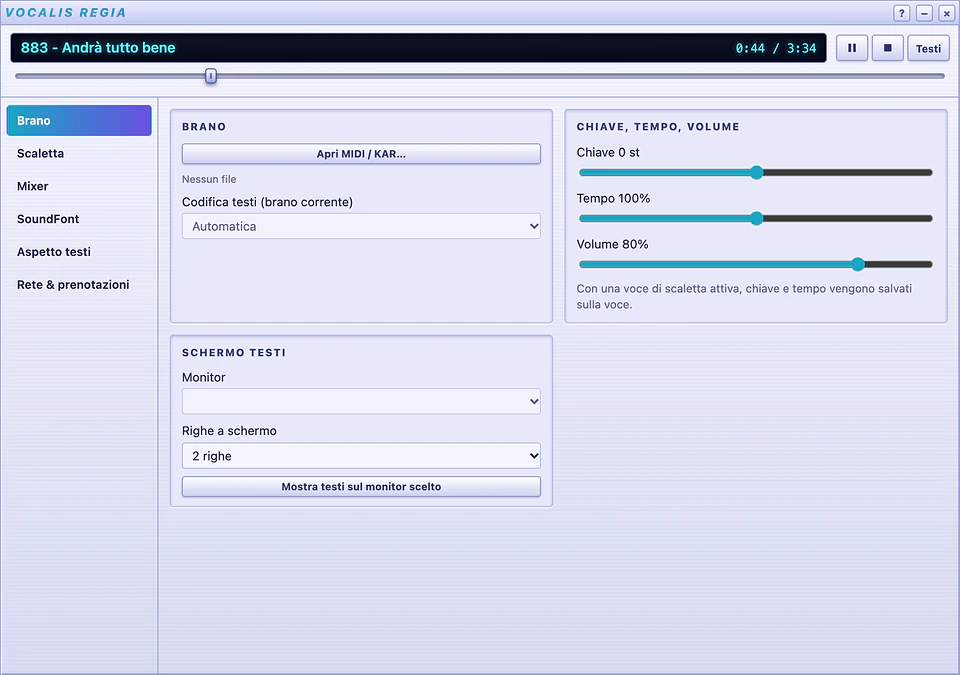
Vocalis is a free MIDI/KAR karaoke player for macOS, Windows and Linux. It follows the layout of classic players such as vanBasco and is built for live nights: the show runs from the computer, lyrics go full screen on a monitor or TV, and singers book their turn from their phones. Its interface is in Italian.

What it does:
- plays
.mid,.midi,.rmiand.karthrough a built-in SoundFont synthesizer, with the GeneralUser GS SoundFont included: it works out of the box; - honours the Roland GS and Yamaha XG settings stored in the files (reverb, chorus, drum kits), and offers a catalog of 8 karaoke-friendly SoundFonts to download in one click;
- key in semitones, tempo and volume, saved per song; a 16-channel mixer with mute, solo and on-the-fly instrument changes;
- lyrics on 2 or 4 lines, animated backgrounds, a countdown before the vocals and a preview of the next song;
- detects the lyric encoding by itself (UTF-8, Latin-1, Windows-1252), so accents stay where they belong;
- MIDI output to an external module or keyboard, and MIDI input to play along with the backing track.
Running the night
- Library: in Library → Sources add the folders with your files; search becomes instant.
- Setlist: add songs to the Playlist; key and tempo stay saved on each entry, and setlists export to
.m3u. - Screen: click KARAOKE and, in Regia → Song, pick the monitor or TV to go full screen.
- Bookings: in Regia → Network & bookings start the local network service and show the QR code. People in the room scan it with their phones, follow the lyrics in the browser and book their turn.
Vocalis runs on macOS 10.15 or later (Apple Silicon and Intel), 64-bit Windows 10 and 11, and Linux (.deb, .rpm and AppImage packages). Download it from the Vocalis page.
Frequently asked questions
Does Vocalis come with backing tracks?
No. Vocalis plays your own .kar and .mid files and does not distribute any backing tracks: you bring the songs.
Can I use an external sound module or keyboard?
Yes. In Setup → Audio/MIDI choose the output: the internal synth, the system synth or an external MIDI instrument. There is also MIDI input, to play live along with the backing track.
Lyrics with accented letters look wrong, what can I do?
Vocalis detects the most likely encoding by itself (UTF-8, Latin-1 or Windows-1252) and remembers it for each song. If an old file fools it, you can change it by hand and it stays saved.