






4DJ

Decks, mixer, stems. Mix right away.

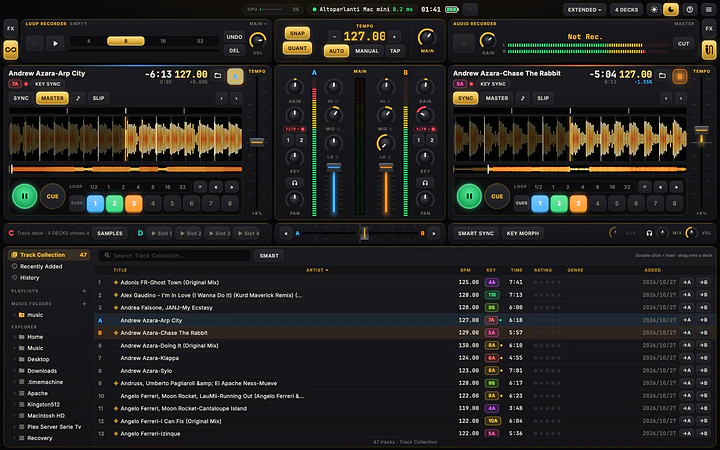
4DJ has the layout DJs already know: decks, mixer, effects and browser where you expect them. And it goes further: stems made on your own computer, transitions that stay in key and in tempo, a tablet as a second screen. Free on macOS, Windows and Linux, Android coming.

Version 1.0.1 macOS, Windows, Linux Also for ARM PCs Free

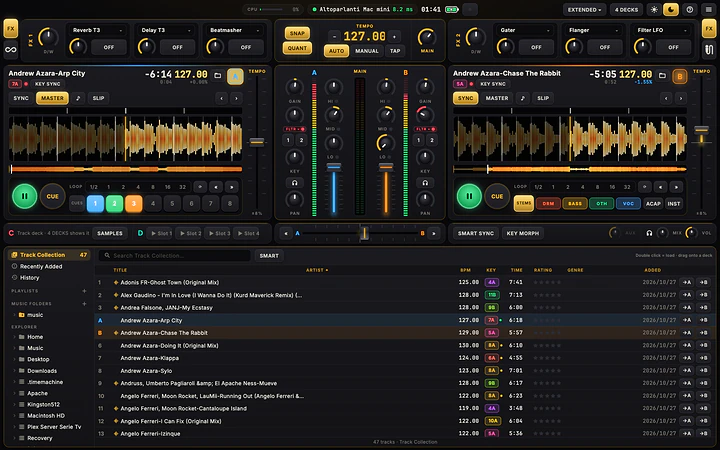
Real screenshot of 4DJ

Mixing needs two things: software that stays out of your way and a controller that works as soon as it is plugged in. That is how 4DJ is built: the Kontrol S2 MK3 and the most common Pioneer DJ controllers are ready at once, any other one is set up by touching the controls a drawing points to, and the collection you have in another DJ app comes in with its BPM, keys, hotcues and playlists. It also runs on Linux and ARM PCs, where most DJ software does not.

Decks, mixer, stems. Mix right away.

DJ software with local stems, in-key transitions and controllers that set themselves up.

Everything where you expect it.

Two or four decks, the mixer in the middle, two FX units on top and the browser below: on first start the assistant asks only for the sound card, your music folders and how many decks. Colour waveforms with zoom, and a phase meter on each deck that turns green when the beats are in time.

  • Play, CDJ-style CUE, 8 hotcues, loops from 1/2 to 32 beats, beatjump, Slip and reverse
  • Key lock, a KEY knob for ±12 semitones, Beat Sync or Tempo Sync
  • Scratch and nudge by dragging the waveform
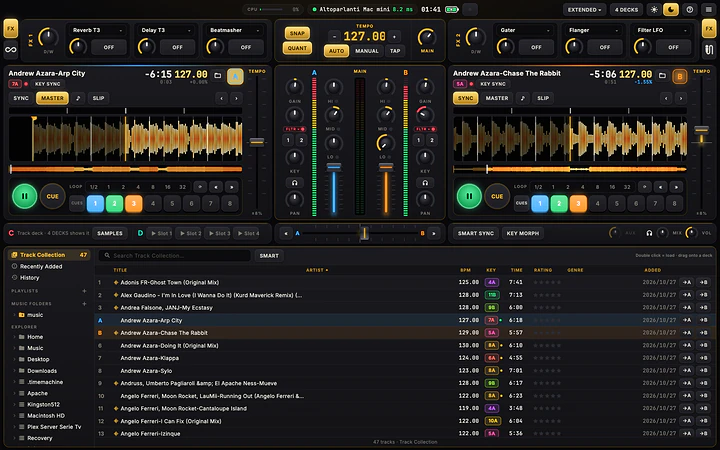
Everything where you expect it.

Stems made on your computer.

StemX splits any track into drums, bass, other and vocals without sending anything online. You prepare them from the browser, once per track, and while a deck plays the work waits, so your set never slows down. On the deck each stem has a volume, a mute, a filter and its own FX switch.

  • ACAP keeps only the vocals, INST removes them
  • On a low-power PC a track takes a few minutes: prepare them before the gig
Stems made on your computer.

In-key transitions, by day and by night.

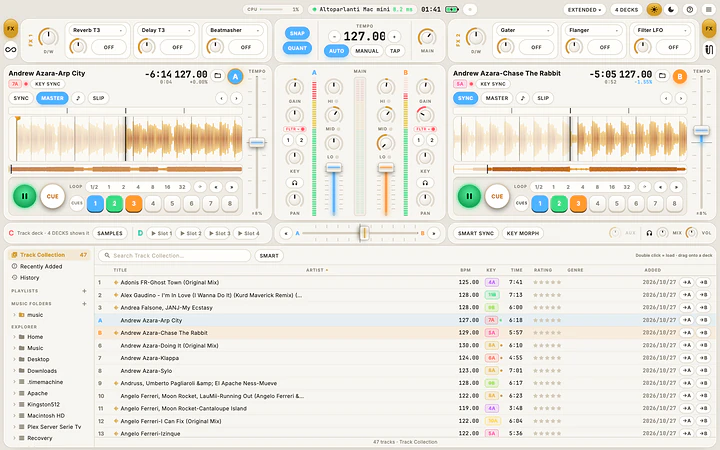
SMART SYNC makes the next crossfade harmonic and in tempo: keys and tempos glide together and the new track ends up in its own key. SMART in the browser sorts tracks by how well they mix with the one playing. Two looks, Night in black and gold for dark booths and a light Day for outdoor sets.

  • Keys in Camelot, Open Key or musical notation, coloured by how well they mix
  • Import a .nml collection with BPM, keys, beatgrids, hotcues and playlists
  • Your audio files are never modified
In-key transitions, by day and by night.

Effects, microphone and recording.

Two FX units with 19 effects (delays, reverbs, flanger, phaser, gater, beatmasher and more), a club-style three-band EQ and filter, a Maximizer on the master. The Audio Recorder records your mix to 24-bit WAV, the Loop Recorder captures 4 to 32 beats and overdubs them.

  • Microphone with talkover and an Aux input
  • Master or headphones also on a second audio device, such as a Bluetooth speaker
  • MIDI clock out and in
Effects, microphone and recording.

Plug in your controller and play.

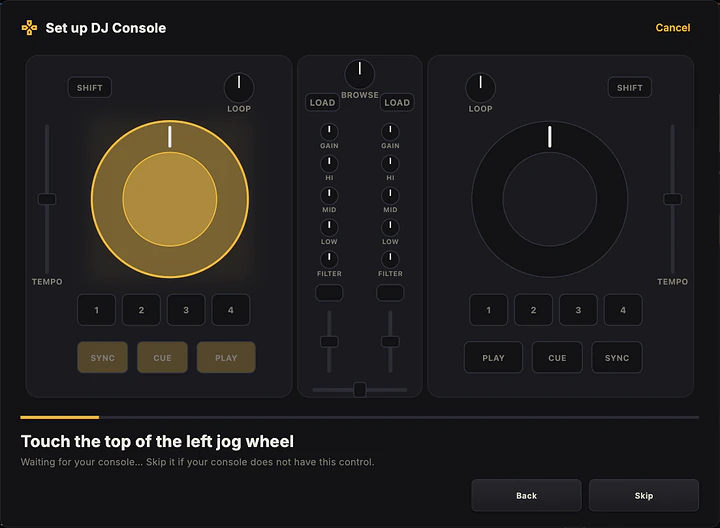
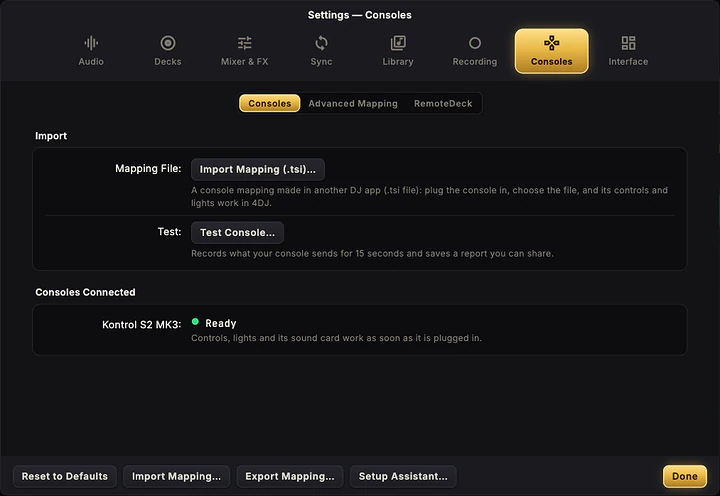
The Kontrol S2 MK3 works natively, sound card included, on Linux too and with about 7 ms of latency on Windows. The most common Pioneer DJ controllers (DDJ-FLX4, DDJ-400, DDJ-FLX6, DDJ-1000 and more) are ready as soon as they are plugged in. For any other one a guided setup shows you the control to touch: nothing to type.

  • Kontrol S2 MK1, S2 MK2, S3, S4 MK2 and S4 MK3 in Beta, with a two-minute check
  • Import .tsi mappings made in another DJ app
  • RemoteDeck: a tablet or phone on your network becomes a second touch screen
Plug in your controller and play.

Turntables, CDJs and timecode.

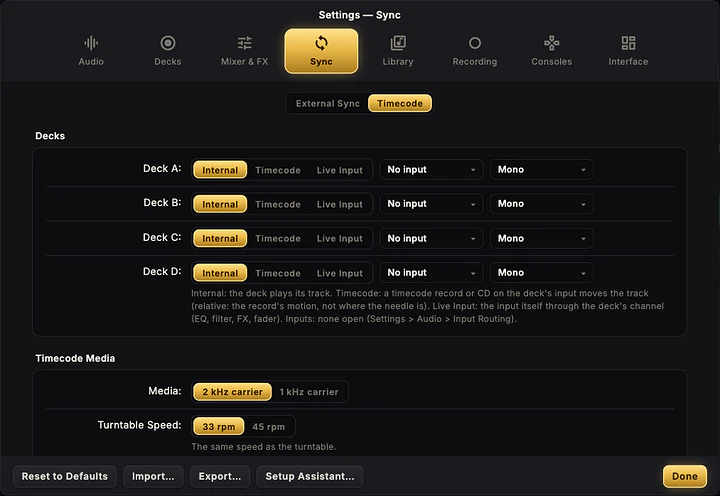
With Live Input decks a turntable or a CDJ goes through a deck's EQ, filter, FX and fader. With timecode, control vinyl or CDs (2 kHz or 1 kHz carrier) move the track in relative mode. Each deck can play its track, a timecode record or its input.

Turntables, CDJs and timecode.

In your language, and well explained.

English, Italian, French, German and Spanish, with the words DJs use (PLAY, CUE, SYNC, LOOP, FX) the same everywhere. The ? at the top right explains every function, with search. A broken file never stops your set: the deck flashes red and the music goes on. On laptops the top bar shows the battery.

  • Export and import every setting, for a backup or another computer
  • Updates checked at start, installed only when you decide
  • Android coming: phone and tablet layouts, with the Kontrol S2 MK3 over USB
In your language, and well explained.

At a glance

Systems
macOS 13.4+ (Apple Silicon and Intel), Windows 10/11 x64 and ARM64, Linux x64 and ARM64; Android coming
Decks
2 or 4, plus Live Input decks and a Sample Deck
Stems
Local StemX: drums, bass, other, vocals; ACAP and INST
Sync
Beat Sync, Tempo Sync, SMART SYNC with Key Morphing, MIDI clock in and out
Effects
2 FX units, 19 effects, Mixer FX, Maximizer
Controllers
Native Kontrol S2 MK3; S2/S3/S4 in Beta; Pioneer DJ DDJ-FLX4, 400, FLX6, 1000, 800, GRV6, REV1, REV5, REV7, 200; any MIDI controller with a guided setup
Inputs
Vinyl and CD timecode (2 kHz / 1 kHz), Live Input, microphone with talkover, Aux
Recording
24-bit WAV Audio Recorder, Loop Recorder with overdub
Library
Collection, playlists, History, Explorer; imports .nml collections and .tsi mappings
Languages
English, Italian, French, German, Spanish
License
Free, including professional use

Get 4DJ.

Pick the file for your system. Every download comes straight from the official releases on GitHub.

macOS

Apple Silicon and Intel

Open the DMG and drag 4DJ into Applications. It works on Apple Silicon and Intel Macs with macOS 13.4 or later.

Windows

x64 and ARM64

Run the MSI: it replaces an earlier version on its own.

For Snapdragon PCs: native ARM64 installer.

Linux

x64 and ARM64

On Debian, Ubuntu and Mint open the .deb with your software installer (or sudo apt install ./4dj_1.0.1_amd64.deb), on Fedora and openSUSE the .rpm (sudo dnf install ./4dj-1.0.1-1.x86_64.rpm). On any distribution make the AppImage executable and open it.

For 64-bit ARM PCs and boards: the same packages, in the arm64 / aarch64 version.

Release notes on GitHub

Requirements

macOS 13.4 or later (Apple Silicon and Intel), 64-bit Windows 10/11 (x64 or ARM64), 64-bit x64 or ARM64 Linux with glibc 2.35 (Ubuntu 22.04, Debian 12, Fedora 36 or later). 8 GB of RAM, 16 recommended; a 1280 × 800 screen. StemX on Linux needs Ubuntu 24.04, Debian 13 or Fedora 39. To cue in headphones you need a sound card with 4 outputs or a DJ controller with its own sound card.

License

Free, including for gigs and professional use. The source code is not public; third-party components and their licenses are listed in the repository.

Questions and answers

Is 4DJ free?

Yes, free, with no ads and no subscriptions, including for gigs and professional use. If you find it useful, you can support its development with a donation.

Does it run on Linux?

Yes, on x64 and ARM64, with .deb, .rpm or AppImage, and with the Kontrol S2 MK3 working natively at about 8 ms of latency. With the .deb and .rpm the controller is ready right after installing; with the AppImage you enable it once the first time you plug it in. StemX needs Ubuntu 24.04, Debian 13, Fedora 39 or later.

Which controllers can I use?

The Kontrol S2 MK3 works natively, sound card included; S2 MK1, S2 MK2, S3, S4 MK2 and S4 MK3 in Beta. The Pioneer DJ DDJ-FLX4, DDJ-400, DDJ-FLX6, DDJ-1000, DDJ-800, DDJ-GRV6, DDJ-REV1, DDJ-REV5, DDJ-REV7 and DDJ-200 are ready as soon as they are plugged in. Any other MIDI controller is set up with the guided assistant, or by importing a .tsi mapping.

Can I bring my collection from another DJ app?

Yes, from a collection.nml file: Import collection (.nml) in the browser brings in tracks, BPM, keys, beatgrids, hotcues, ratings and playlists. The file is only read, never changed.

Can I cue in headphones without a controller?

You need a sound card with at least 4 outputs (2 for the master, 2 for headphones) or a DJ controller with its own sound card. Alternatively the master can play on a second device, such as a Bluetooth speaker, while the headphones stay on the main card.

Does 4DJ change my music files?

No. BPM, keys, grids, cues and ratings stay in 4DJ's library, and stems are saved in a separate folder.

When is the Android version coming?

Soon on the Play Store, with phone and tablet layouts and the Kontrol S2 MK3 over USB. The link will appear here as soon as it is available.

The system blocks the app on first launch: what do I do?

4DJ is not yet signed with an Apple or Microsoft certificate. On macOS open System Settings › Privacy & Security and choose Open Anyway. On Windows, if SmartScreen stops it, click More info › Run anyway.

Is 4DJ useful to you?

4DJ is free, with no ads and no subscriptions, and built after hours. If it plays your gigs, a donation pays for signed installers (no more confirmations on first launch on macOS and Windows), the controllers to test it on and the time for the next versions, starting with Android.

Next app: ForgeWave The professional audio editor, free on Mac, Windows and Linux.