













Termina

Your servers, one click away.

Termina is a native SSH client for Mac: a real terminal, the server's files alongside, tunnels and keys protected by Touch ID. Type user@host and you are in. Free, with no account and no tracking.

Version 0.8.1 macOS Free

Real screenshot of Termina

Anyone who runs a server, a NAS or a Raspberry Pi spends half their time remembering addresses, ports and keys. Termina keeps them tidy in a list with groups, colours and icons, and gets you in with one click. Passwords and keys live in the Mac's Keychain, unlocked with Touch ID, and keys created in the Secure Enclave cannot be copied even if you wanted to. If you already use ssh from Terminal, you import your ~/.ssh folder in one go.

Your servers, one click away.

A native SSH client for Mac: terminal, files, tunnels and keys safe in the Keychain.

A real terminal, native to the Mac.

xterm-256color with GPU (Metal) rendering and true colour: vim, htop and tmux behave just as they do in Terminal. Each server opens in a tab and you switch with ⌘1…⌘9. If the connection drops, a card explains why and offers Reconnect or Edit Server, without leaving the session.

  • Search the output with ⌘F, clear it with ⌘K, text size with ⌘+ and ⌘-
  • Links in the output open directly
  • With a tmux session the shell survives even when the connection drops
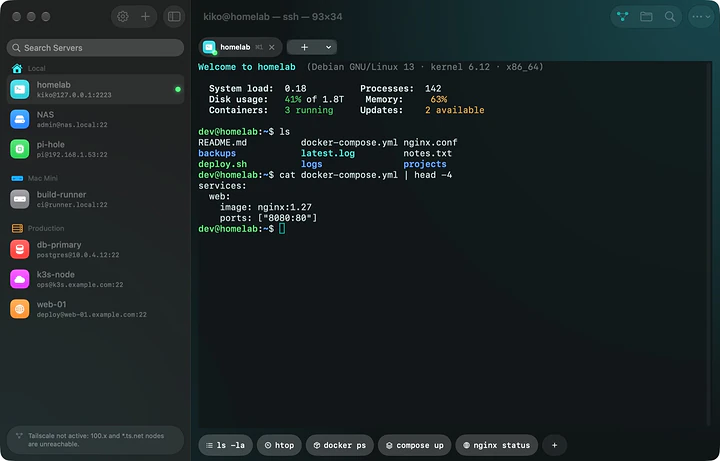
A real terminal, native to the Mac.

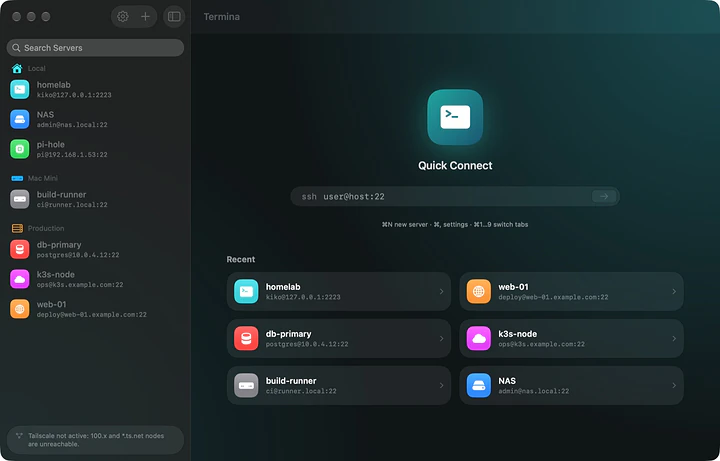
Type user@host and you are in.

Quick Connect works like ssh in Terminal: type the address, press Return and Termina asks for the password. If you want to keep it, Save Server adds it to your list with the password already filled in. Saved servers have groups, colours and icons, so you find them at a glance.

  • Password, OpenSSH key (Ed25519 or RSA) or Secure Enclave key
  • On first connection it checks the server's fingerprint; if it ever changes, Termina refuses to connect
  • Tailscale detected automatically
Type user@host and you are in.

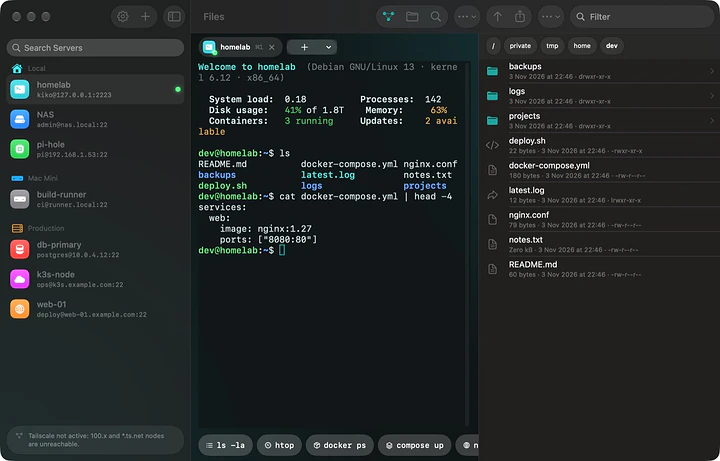
The server's files, next to the terminal.

The Files panel (⇧⌘F) shows the server's folders over SFTP without opening another app. Drag files in to upload them, open a text file to edit it, and preview the rest with Quick Look. Open in Terminal takes the shell to that folder.

  • Download, rename, change permissions, copy the path
  • Edit configuration files right on the server
The server's files, next to the terminal.

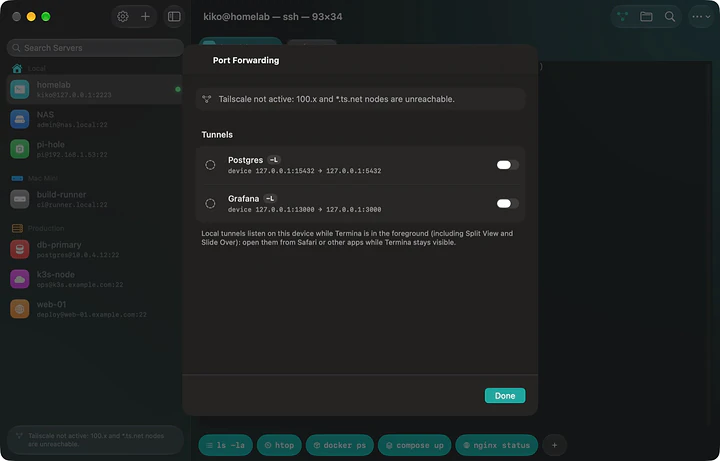
Tunnels, jump hosts and agent forwarding.

Port forwarding reaches services only the server can see, such as a database or an admin panel: local (-L) and remote (-R) tunnels with live status and traffic. Servers behind a bastion are reached like with ssh -J, up to 4 hops, and with agent forwarding git on the server uses your key without copying it.

  • Web tunnels open in the browser with one click
  • A single Touch ID even through the jump host
Tunnels, jump hosts and agent forwarding.

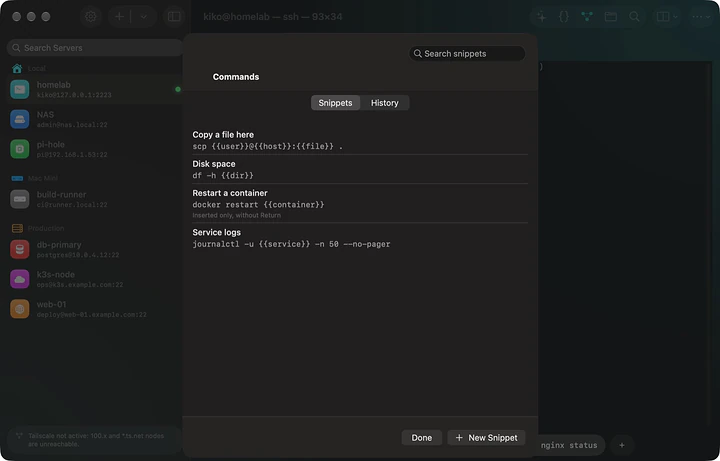
Snippets, history and an assistant on your Mac.

Snippets are saved commands that work on every server, with variables in double braces: {{host}}, {{user}} and {{dir}} fill in by themselves, others like {{service}} are asked each time. History keeps each server's commands. With Apple Intelligence the assistant finds the right command or explains an error, without sending anything online.

  • The assistant never runs anything: it types the command and you press Return
  • An orange warning flags commands that delete or change something
  • One-click macros in the Command Deck, different for each server
Snippets, history and an assistant on your Mac.

Two sessions side by side.

Keep one server's logs open while you work on another: ⌘D splits the window with the next tab, side by side or stacked. The active pane has a coloured header and gets the keyboard, files and tunnels; each terminal fits its rows and columns to its half.

  • ⌘⌥← and ⌘⌥→ switch pane, ⇧⌘D goes back to one session
Two sessions side by side.

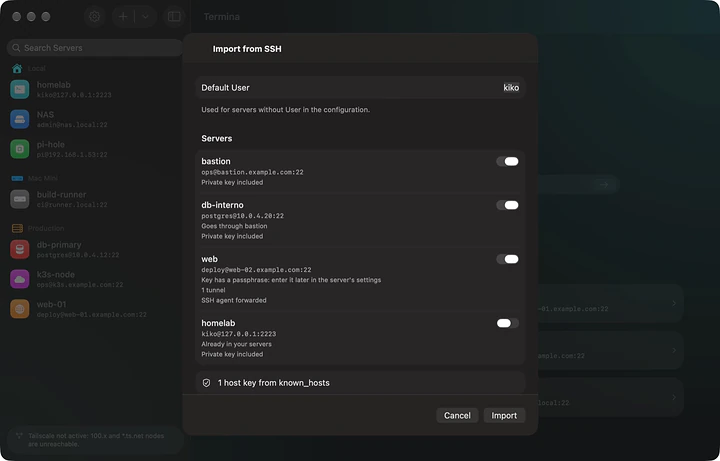
Bring everything over from ~/.ssh, in one go.

If you already use ssh, Termina reads your .ssh folder: Host, HostName, User, Port, IdentityFile, ProxyJump, tunnels and ForwardAgent, with the private keys and the trusted hosts from known_hosts. You see a preview and pick what to import; your files are never changed.

  • Passwords and keys in the Keychain, unlocked with Touch ID or your Mac password
  • End-to-end encrypted iCloud sync between your Macs, with no Termina account
  • No account, no analytics, no tracking
Bring everything over from ~/.ssh, in one go.

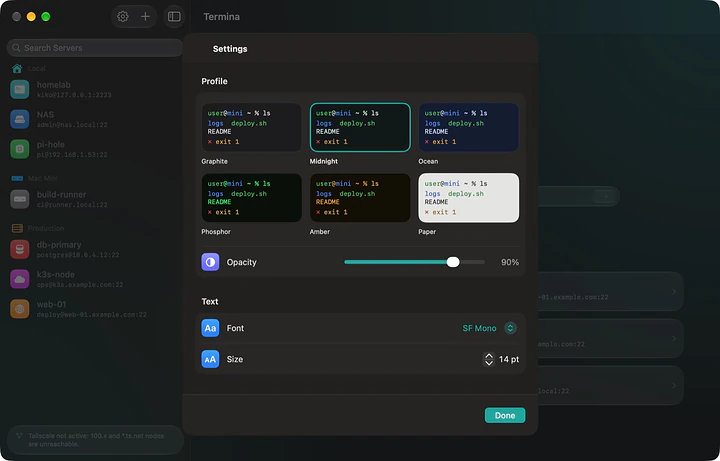
Made your way, in your language.

Six colour themes with live preview, font, size, cursor and opacity. English, Italian, French, German and Spanish. Siri, Shortcuts and Spotlight know your servers: "Connect to homelab with Termina". And the built-in guide explains every feature step by step (⌘?).

  • Option as Meta for Emacs, bash and tmux
  • Handoff: start on one Mac and carry on on another, on the same server
  • iPhone and iPad versions coming to the App Store
Made your way, in your language.

At a glance

System
macOS 15 Sequoia or later, Apple Silicon and Intel
Terminal
xterm-256color, GPU (Metal) rendering, true colour, tabs, two sessions side by side
Authentication
Password, Ed25519 and RSA keys, Secure Enclave keys, Touch ID
Files
SFTP: upload, download, edit, permissions, Quick Look
Networking
Port forwarding -L and -R, jump hosts (ProxyJump) up to 4 hops, SSH agent forwarding, Tailscale
Productivity
Snippets with {{variables}}, per-server history, macros, Siri, Shortcuts, Spotlight
Import
~/.ssh: config, private keys, known_hosts
Sync
End-to-end encrypted iCloud, Handoff
Languages
English, Italian, French, German, Spanish
License
Free, including professional use

Get Termina.

Pick the file for your system. Every download comes straight from the official releases on GitHub.

macOS

Apple Silicon and Intel

Open the DMG and drag Termina into Applications. It is signed and notarized by Apple, so it opens with no warnings. It works on Apple Silicon and Intel Macs with macOS 15 Sequoia or later.

Release notes on GitHub

Requirements

macOS 15 Sequoia or later, on Apple Silicon (M1 or later) or Intel Macs. The Liquid Glass look needs macOS 26 Tahoe; the assistant needs Apple Intelligence (Apple Silicon and macOS 26). Secure Enclave keys need Apple Silicon or an Intel Mac with the T2 chip. You need an SSH server you can reach: on your network, over the Internet or through a VPN such as Tailscale.

License

Free, including professional use. The source code is not public.

Questions and answers

Is Termina free?

Yes, the Mac version is free, with no account, no ads and no subscriptions, including for professional use. If you find it useful, you can support its development with a donation.

Are my passwords and keys safe?

They stay only in your Mac's Keychain, unlocked with Touch ID or your Mac password. With iCloud sync they travel through your own iCloud, end-to-end encrypted: neither Apple nor the developer can read them. Keys created in the Secure Enclave never leave the chip, not even for Termina.

Can I import the servers I already use with ssh?

Yes: File › Import from ~/.ssh reads config, private keys and known_hosts, including jump hosts, tunnels and ForwardAgent. You see a preview and pick what to import; your files are not changed. In the panel press ⌘⇧. to see the hidden .ssh folder.

Will I see a security warning on first launch?

No. Termina is signed with an Apple Developer ID certificate and notarized by Apple, so it opens like any other app.

Does Termina collect any data?

No. No account, analytics or tracking: Termina connects only to the servers you add and, if sync is on, to your own iCloud. The assistant runs on your Mac with Apple Intelligence too.

How do I keep long jobs running if the connection drops?

Type a name in the server's tmux session field: Termina runs tmux new-session -A -s <name> after login and, when it reconnects, takes you back to the same shell with everything still running. tmux must be installed on the server.

Is it available for iPhone and iPad?

The iPhone and iPad versions are coming to the App Store, with iCloud sync and Handoff between devices. The link will appear here as soon as they are available.

Is Termina useful to you?

Termina is free, with no account, no ads and no tracking, and built after hours. If it makes your server work easier, a donation pays for the time to build the next versions, starting with iPhone and iPad. On macOS it is already signed and notarized by Apple, thanks to a supporter.

Next app: 4DJ DJ software with local stems, in-key transitions and controllers that set themselves up.