















Termina

Your servers, one click away.

Termina is an SSH client for Mac, Windows and Linux: a real terminal, the server's files alongside, tunnels and keys kept safe. Type user@host and you are in. Free, with no account and no tracking.

Version 1.0.1 macOS, Windows, Linux Also for ARM PCs Free

Real screenshot of Termina

Anyone who runs a server, a NAS or a Raspberry Pi spends half their time remembering addresses, ports and keys. Termina keeps them tidy in a list with groups, colours and icons, and gets you in with one click. On the Mac passwords and keys live in the Keychain, unlocked with Touch ID, and keys created in the Secure Enclave cannot be copied even if you wanted to. On Windows and Linux you get the same app, with the same look. If you already use ssh, you import your ~/.ssh folder in one go.

Your servers, one click away.

An SSH client for Mac, Windows and Linux: terminal, files, tunnels and keys kept safe.

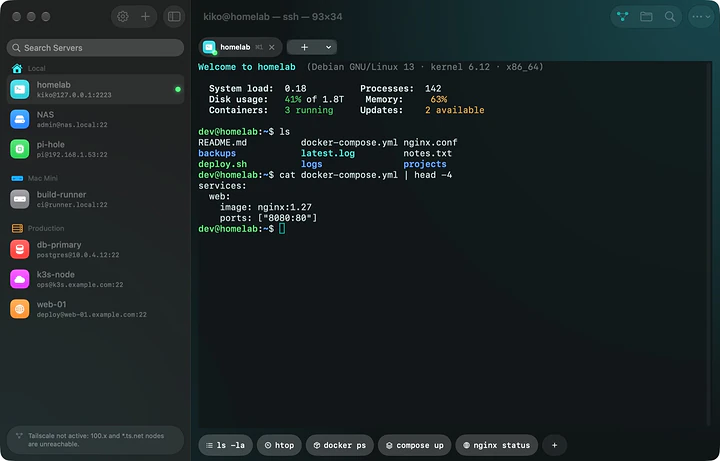
A real terminal, on every computer.

xterm-256color with GPU rendering and true colour: vim, htop and tmux behave just as they do in your system terminal. Each server opens in a tab and you switch with ⌘1…⌘9 (Ctrl on Windows and Linux). If the connection drops, a card explains why and offers Reconnect or Edit Server, without leaving the session.

  • Search the output with ⌘F, clear it with ⌘K, text size with ⌘+ and ⌘-
  • Links in the output open directly
  • With a tmux session the shell survives even when the connection drops
A real terminal, on every computer.

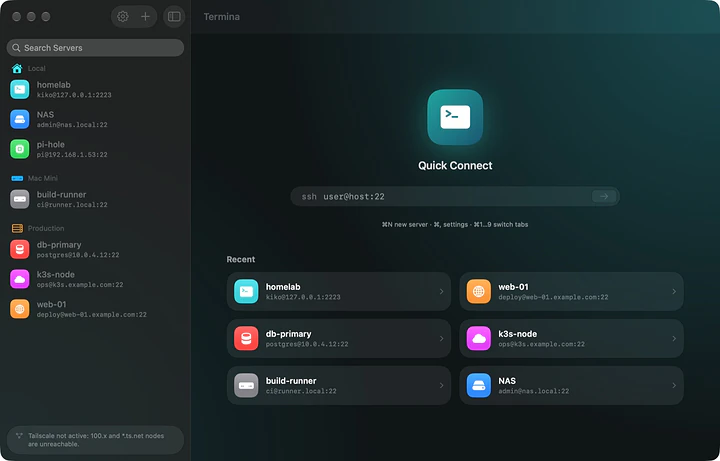
Type user@host and you are in.

Quick Connect works like ssh in a terminal: type the address, press Return and Termina asks for the password. If you want to keep it, Save Server adds it to your list with the password already filled in. Saved servers have groups, colours and icons, so you find them at a glance.

  • Password or OpenSSH key (Ed25519 or RSA); on the Mac also Secure Enclave keys
  • On first connection it checks the server's fingerprint; if it ever changes, Termina refuses to connect
  • Tailscale detected automatically
Type user@host and you are in.

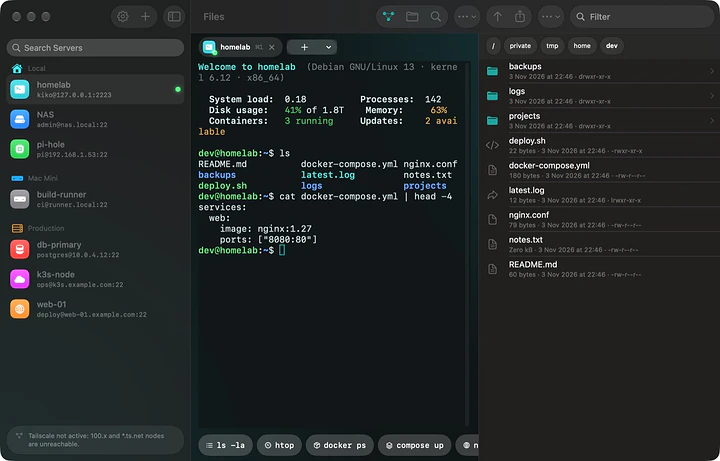
The server's files, next to the terminal.

The Files panel (⇧⌘F) shows the server's folders over SFTP without opening another app. Drag files in to upload them, open a text file to edit it and preview the rest. Open in Terminal takes the shell to that folder.

  • Download, rename, change permissions, copy the path
  • Edit configuration files right on the server
The server's files, next to the terminal.

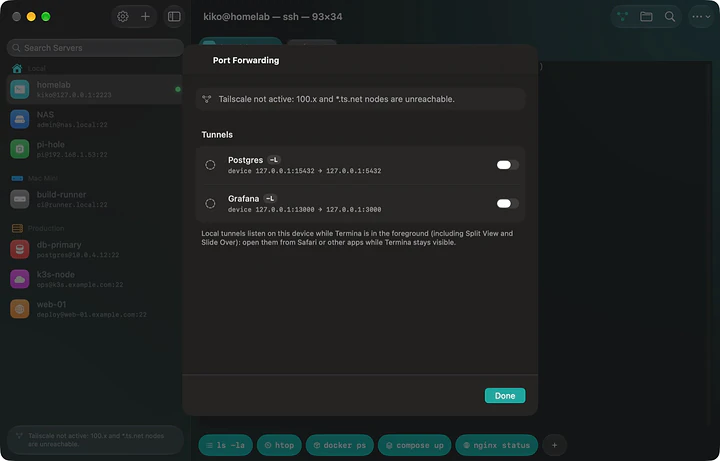
Tunnels, jump hosts and agent forwarding.

Port forwarding reaches services only the server can see, such as a database or an admin panel: local (-L) and remote (-R) tunnels with live status and traffic. Servers behind a bastion are reached like with ssh -J, up to 4 hops, and with agent forwarding git on the server uses your key without copying it.

  • Web tunnels open in the browser with one click
  • On the Mac, a single Touch ID even through the jump host
Tunnels, jump hosts and agent forwarding.

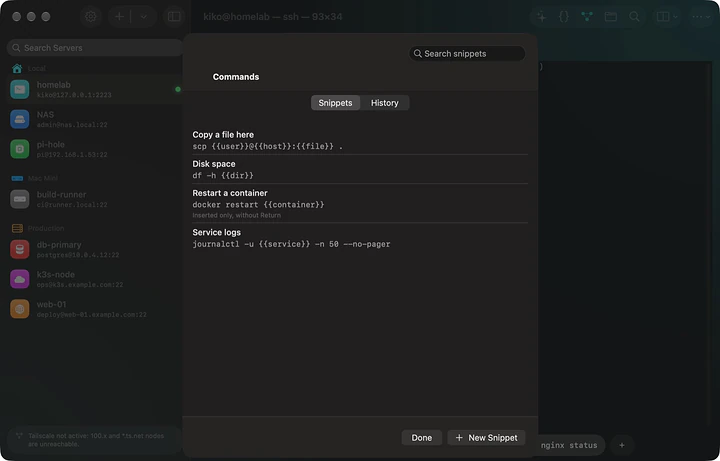
Snippets, history and macros.

Snippets are saved commands that work on every server, with variables in double braces: {{host}}, {{user}} and {{dir}} fill in by themselves, others like {{service}} are asked each time. History keeps each server's commands. On the Mac, with Apple Intelligence, the assistant finds the right command or explains an error, without sending anything online.

  • The assistant never runs anything: it types the command and you press Return
  • An orange warning flags commands that delete or change something
  • One-click macros in the Command Deck, different for each server
Snippets, history and macros.

Two sessions side by side.

Keep one server's logs open while you work on another: ⌘D splits the window with the next tab, side by side or stacked. The active pane has a coloured header and gets the keyboard, files and tunnels; each terminal fits its rows and columns to its half.

  • ⌘⌥← and ⌘⌥→ switch pane, ⇧⌘D goes back to one session
Two sessions side by side.

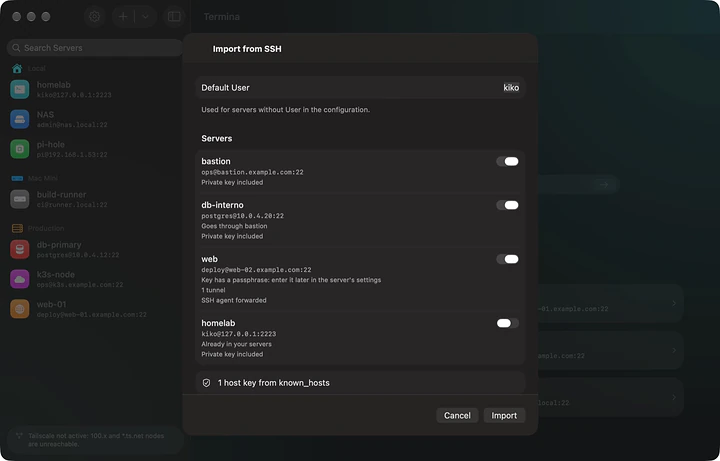
Bring everything over from ~/.ssh, in one go.

If you already use ssh, Termina reads your .ssh folder: Host, HostName, User, Port, IdentityFile, ProxyJump, tunnels and ForwardAgent, with the private keys and the trusted hosts from known_hosts. You see a preview and pick what to import; your files are never changed.

  • On the Mac passwords and keys in the Keychain, unlocked with Touch ID; on Linux in the GNOME or KDE keyring
  • On the Mac end-to-end encrypted iCloud sync, with no Termina account
  • No account, no analytics, no tracking
Bring everything over from ~/.ssh, in one go.

Made your way, in your language.

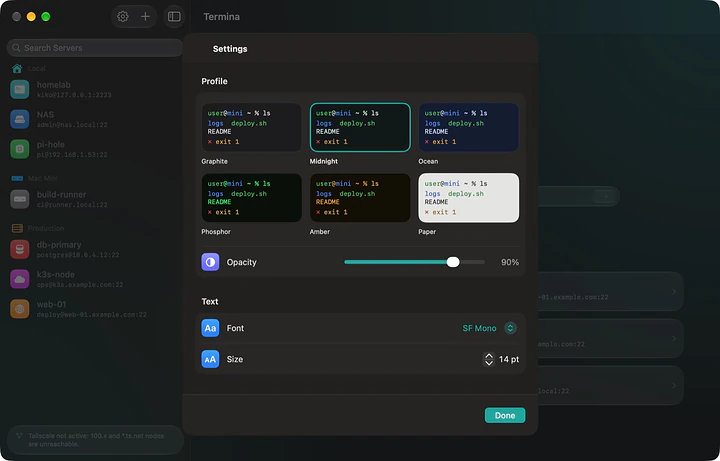
Six colour themes with live preview, font, size, cursor and opacity. English, Italian, French, German and Spanish. On Windows and Linux Termina looks just like the Mac app: glass toolbars and tabs, the same sidebar, settings in a sheet. And the built-in guide explains every feature step by step.

  • Option (Alt) as Meta for Emacs, bash and tmux
  • On the Mac Siri, Shortcuts and Spotlight: "Connect to homelab with Termina"
  • Updates itself, on every system
Made your way, in your language.

At a glance

Systems
macOS 15 Sequoia or later (Apple Silicon and Intel), Windows 10/11 x64 and Windows 11 ARM64, x64 and ARM64 Linux
Terminal
xterm-256color, GPU rendering, true colour, tabs, two sessions side by side
Authentication
Password, Ed25519 and RSA keys; on the Mac Secure Enclave keys and Touch ID
Files
SFTP: upload, download, edit, permissions, preview
Networking
Port forwarding -L and -R, jump hosts (ProxyJump) up to 4 hops, SSH agent forwarding, Tailscale
Productivity
Snippets with {{variables}}, per-server history, macros; on the Mac Siri, Shortcuts and Spotlight
Import
~/.ssh: config, private keys, known_hosts
Sync
On the Mac end-to-end encrypted iCloud and Handoff
Languages
English, Italian, French, German, Spanish
License
Free, including professional use

Get Termina.

Pick your system. You can also install it from the stores: Microsoft Store (the version signed by Microsoft) and Snap Store for Linux. Every file, older versions included and for anyone who skips the stores, stays on the official releases on GitHub.

Also available on

  • Microsoft Store
  • Snap Store
macOS

Apple Silicon and Intel

Open the DMG and drag Termina into Applications. It is signed and notarized by Apple, so it opens with no warnings. It works on Apple Silicon and Intel Macs with macOS 15 Sequoia or later.

Windows

x64 and ARM64

Install it from the Microsoft Store: it is signed by Microsoft, installs with no warnings and updates itself. 64-bit Windows 10 (1809) or 11.

For Snapdragon PCs and Windows in Parallels on Macs: the Microsoft Store version is native ARM64, signed by Microsoft and updates itself.

The signed version is the one on the Microsoft Store: it installs with no warnings and updates itself. If you would rather skip the Store, the installers above come from GitHub and need no account, but they are not signed: Windows may show "Windows protected your PC" (More info › Run anyway), and you download updates yourself.

Linux

x64 and ARM64

On Ubuntu and any distro with snap, from the Snap Store or the terminal: sudo snap install termina

On Debian, Ubuntu and Mint: sudo apt install ./termina_1.0.1_amd64.deb. On any distribution with GTK 3, extract the .tar.gz anywhere and run termina. Passwords and keys go into the GNOME or KDE keyring.

For Raspberry Pi 4/5 with 64-bit Raspberry Pi OS and ARM laptops: the same packages in the arm64 build (sudo apt install ./termina_1.0.1_arm64.deb).

Release notes on GitHub Older versions on GitHub

Requirements

Mac: macOS 15 Sequoia or later, Apple Silicon (M1 or later) or Intel; the Liquid Glass look needs macOS 26 Tahoe, the assistant Apple Intelligence. Windows: 64-bit Windows 10 (1809) or 11, or Windows 11 on ARM. Linux: x64 or ARM64 with GTK 3 (Debian 12, Ubuntu 22.04, Fedora 38, 64-bit Raspberry Pi OS Bookworm or later). Windows and Linux have no iCloud sync, Handoff, Siri, Spotlight, Secure Enclave keys or assistant, and ⌘ becomes Ctrl. You need an SSH server you can reach: on your network, over the Internet or through a VPN such as Tailscale.

License

Free, including professional use. The source code is not public.

Questions and answers

Is Termina free?

Yes, Termina is free on Mac, Windows and Linux, with no account, no ads and no subscriptions, including for professional use. If you find it useful, you can support its development with a donation.

Does it work on Windows and Linux?

Yes, since version 1.0. On Windows 10/11 (x64 and ARM64) and Linux (x64 and ARM64, including 64-bit Raspberry Pi OS) Termina has the same look and features as on the Mac: terminal, SFTP files, tunnels, jump hosts, snippets and import from ~/.ssh. iCloud sync, Handoff, Siri, Spotlight, Secure Enclave keys and the assistant stay Mac-only. Shortcuts with ⌘ use Ctrl.

Are my passwords and keys safe?

They stay only on your computer. On the Mac they live in the Keychain, unlocked with Touch ID or your Mac password, and with iCloud sync they travel through your own iCloud, end-to-end encrypted: neither Apple nor the developer can read them. Keys created in the Secure Enclave never leave the chip, not even for Termina. On Linux they go into the GNOME or KDE keyring.

Can I import the servers I already use with ssh?

Yes: Import from ~/.ssh reads config, private keys and known_hosts, including jump hosts, tunnels and ForwardAgent. You see a preview and pick what to import; your files are not changed. On the Mac, press ⌘⇧. in the panel to see the hidden .ssh folder.

Will I see a security warning on first launch?

No. On the Mac Termina is signed with an Apple Developer ID certificate and notarized by Apple, so it opens like any other app. On Windows (x64 and ARM64) you install it from the Microsoft Store, where it is signed by Microsoft: no "Windows protected your PC" warning and automatic updates.

Does Termina collect any data?

No. No account, analytics or tracking: Termina connects only to the servers you add and, on the Mac with sync on, to your own iCloud. The assistant runs on your Mac with Apple Intelligence too.

How do I keep long jobs running if the connection drops?

Type a name in the server's tmux session field: Termina runs tmux new-session -A -s <name> after login and, when it reconnects, takes you back to the same shell with everything still running. tmux must be installed on the server.

How does it update?

By itself: on the Mac and Linux Termina finds and installs new versions, on Windows the Microsoft Store updates it, and the Snap Store updates the Snap Store version. What is new in each version is in the release notes on GitHub.

Is Termina useful to you?

Termina is free, with no account, no ads and no tracking, and built after hours. If it makes your server work easier, a donation pays for the time to build the next versions. Termina is already signed on macOS, thanks to a supporter, and on Windows through the Microsoft Store.

Next app: 4DJ DJ software with local stems, in-key transitions and controllers that set themselves up.